Best Apps for Managing Personal Finances
Compare the best personal finance apps of 2026 for budgeting, saving, and investing, and find the right tool for Managing Personal Finances.
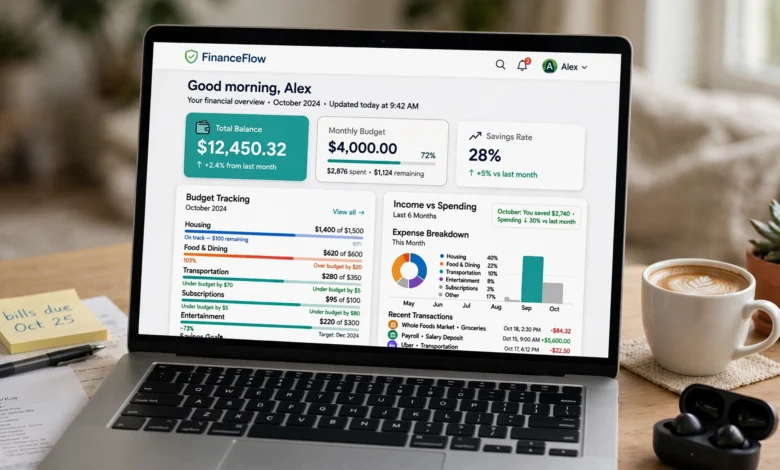
Personal finance apps have quietly become one of the most useful tools in a modern money routine. You don’t need a spreadsheet background or a finance degree to use one. You just need a phone and a willingness to look at your numbers honestly. That’s really the whole pitch. The best apps for managing personal finances take the guesswork out of budgeting, connect directly to your bank and credit card accounts, and show you where your money is actually going instead of where you think it’s going.
If you’ve ever opened your banking app at the end of the month and wondered where your paycheck disappeared to, you’re not alone. A 2025 survey by the National Endowment for Financial Education found that a majority of Americans feel anxious about their financial situation, and a lack of visibility into spending is one of the biggest drivers of that stress. Budgeting apps and money management apps exist to solve exactly that problem: they turn scattered transactions into a clear picture you can actually act on.
In this guide, we’ll walk through the best personal finance apps on the market right now, what makes each one different, and how to pick the one that actually fits your life instead of fighting against it. We’ll cover budgeting tools, investment trackers, debt payoff apps, and a few free options for people who don’t want to pay a subscription just to see their own bank balance. By the end, you should have a clear sense of which app deserves a spot on your home screen.
Why Use a Personal Finance App in the First Place?
Before comparing specific tools, it’s worth answering a more basic question: do you actually need one? For a lot of people, the answer is yes, and not because budgeting has to be complicated. It’s because personal finance management gets exponentially harder once you’re juggling more than one bank account, a credit card or two, a retirement account, and maybe a side hustle or freelance income. Trying to track all of that manually in a notebook or a basic spreadsheet is doable, but most people abandon it within a few weeks.
A good money management app does three things well:
- Automatic account syncing so you’re not manually entering every coffee purchase
- Spending categorization that shows patterns you’d otherwise miss
- Goal tracking for savings, debt payoff, or investing targets
Some apps go further with cash flow forecasting, net worth tracking, or AI-driven insights that flag unusual spending before it becomes a problem. Others stay intentionally simple. Neither approach is wrong. It depends on whether you want a tool that does the thinking for you or one that teaches you to think about money differently.
How We Evaluated These Apps
We looked at cost, ease of use, bank-syncing reliability, security practices, and how well each app handles the basics: budgeting, saving, and tracking where your money goes. We also considered who each app is actually built for, since the right choice for a freelancer managing irregular income looks nothing like the right choice for a couple trying to combine finances for the first time. With that in mind, here are the standout personal finance apps worth your attention in 2026.
1. YNAB (You Need A Budget)
YNAB remains one of the most respected names in budgeting apps, and for good reason. It’s built around zero-based budgeting, meaning every dollar you earn gets assigned a job the moment it hits your account. Rent, groceries, savings, fun money. Nothing sits around unaccounted for.
What Makes YNAB Different
Most money management apps show you what already happened. YNAB pushes you to plan before you spend. That proactive structure is exactly why it has such a loyal following among people who’ve tried other budgeting tools and felt like they were always playing catch-up.


Key features include:
- Zero-based budgeting with real-time category tracking
- Goal-setting tools that calculate how much to save weekly or monthly to hit a target
- Extensive free education through workshops, podcasts, and guides
- Shared budgeting for couples or families
YNAB isn’t free. It runs about $109 a year or roughly $15 a month after a trial period, which is more than several competitors. But for people who want hands-on control and are willing to put in a bit of setup time, it tends to pay for itself. YNAB reports that new users typically find hundreds of dollars in their first couple of months just from budgeting more intentionally.
Who Should Use It
If you like structure and want to actively participate in your budget rather than watch it happen passively, YNAB is worth the cost. If you’d rather set something up once and mostly forget about it, keep reading.
2. Monarch Money
Monarch has grown quickly into one of the most complete personal finance apps available, largely by filling the gap left when Mint shut down. It combines budgeting, net worth tracking, investment monitoring, and goal planning into a single dashboard that doesn’t feel cluttered.
Standout Features
- Flexible budgeting styles, including both category-based and flex budgeting
- Custom dashboards you can rearrange based on what matters most to you
- Collaborative budgeting built for couples and households
- Net worth tracking across bank, credit, investment, and loan accounts
Monarch has picked up recognition as a top budgeting app from several major outlets, and it’s easy to see why. The interface feels modern without being overwhelming, and the automation around transaction categorization is solid enough that you’re not stuck manually recategorizing every purchase.
Who Should Use It
Monarch is a strong fit for people who want an all-in-one money management app without the strict discipline that YNAB demands. It’s especially good for couples managing shared finances, since the collaborative features are genuinely useful rather than bolted on.
3. Quicken Simplifi
Simplifi by Quicken has built a reputation as one of the most affordable and approachable budgeting apps on the market, often priced around $3 to $6 a month depending on the plan. It’s been recognized by several review outlets as a top pick for managing household finances.
What Sets Simplifi Apart
Simplifi’s biggest strength is its Spending Plan feature, which shows you what’s actually available to spend right now after accounting for upcoming bills. Rather than just looking backward at last month’s transactions, it projects your cash flow forward, so you can see a potential shortfall before it happens instead of after.
Notable features:
- Real-time Spending Plan that adjusts as bills come due
- Projected cash flow modeling weeks or months ahead
- Customizable savings goals tied directly into the monthly plan
- Subscription and recurring expense tracking
Who Should Use It
If forward-looking visibility matters more to you than rigid budgeting rules, Simplifi is one of the better apps for managing personal finances you can get for the price. It’s particularly well suited to people with variable income who need to see what’s coming, not just what already happened.
4. Empower (formerly Personal Capital)
Empower occupies a slightly different niche than most budgeting-first apps. It’s built primarily around investment tracking and net worth, with budgeting features layered on top rather than the other way around.
Why Empower Stands Out
- Free access to most core features, including account aggregation and net worth tracking
- A fee analyzer that shows the real cost of your investment fees, often revealing charges people didn’t realize they were paying
- Retirement and education planning calculators
- Investment checkup tools that flag portfolio allocation issues
Because Empower is free, it’s a popular entry point for people who want visibility into their full financial picture, including investments, without committing to a paid subscription. The tradeoff is that its day-to-day budgeting tools are less detailed than YNAB or Simplifi.
Who Should Use It
Empower makes the most sense for people with meaningful investment accounts who want a bird’s-eye view of net worth alongside basic spending tracking. If your main goal is granular budgeting, it’s not the strongest choice, but as a free money management app for the bigger picture, it’s hard to beat.
5. PocketGuard
PocketGuard takes a simplified approach to personal finance management by boiling everything down to one number: how much you have left to spend after bills, goals, and necessities are covered. That “In My Pocket” figure is the whole point.
Core Features
- Automatic bill tracking and categorization
- A simplified “safe to spend” number that updates daily
- Debt payoff planning available through the paid PocketGuard Plus tier
- Subscription tracking to catch recurring charges you forgot about
PocketGuard strips away a lot of the complexity that intimidates people who’ve never budgeted before. There’s no zero-based budgeting to learn and no complicated category structure to maintain. You just open the app and see a number.
Who Should Use It
If budgeting apps have felt overwhelming to you in the past, PocketGuard’s simplicity might be the thing that finally sticks. It’s a solid entry point for money management app beginners who want clarity without a learning curve.
6. EveryDollar
Built by Dave Ramsey’s company, EveryDollar uses the same zero-based budgeting philosophy as YNAB but wraps it in a simpler, more guided experience. It relaunched in 2026 with features like a “margin finder” tool designed to locate extra breathing room in your monthly budget.
What’s Included
- Zero-based budgeting with a clean, guided setup
- Daily lessons and coaching content built around Ramsey’s debt-payoff philosophy
- Personalized budget plans based on your income and goals
- Bank syncing available on the premium tier (the free version requires manual entry)
The free version doesn’t sync with your bank, which is a real limitation if you want automation. But for people following a structured debt-payoff plan, especially fans of the debt snowball method, EveryDollar’s guided approach can be genuinely motivating.
Who Should Use It
EveryDollar suits people who want built-in coaching and structure, particularly those working through debt payoff and looking for accountability rather than just a tracking tool.
7. Credit Karma
Credit Karma isn’t a full budgeting platform, but it deserves a mention because so many people already use it and don’t realize how much it can do. Alongside free credit score monitoring, it now offers account syncing, spending insights, and fraud alerts.
Useful Features
- Free credit score tracking with regular updates
- Real-time fraud and identity theft alerts
- Spending overview across linked accounts
- Personalized recommendations for credit cards and loans based on your profile
Credit Karma works well as a companion to a dedicated budgeting app rather than a replacement for one. Its strength is credit monitoring, not detailed budget categorization.
Who Should Use It
If you’re not ready to commit to a full money management app yet but want a free way to keep an eye on your credit and catch fraud early, Credit Karma is worth having installed regardless of what else you use.
8. Origin
Origin has positioned itself as a unified platform that tries to combine budgeting, investing, forecasting, and AI-driven guidance in one place, built with an eye toward U.S. compliance and data security standards. It also supports shared partner access at no extra cost, letting couples filter transactions by member so it’s clear whose spending is whose.
Notable Features
- AI-powered categorization and predictive cash flow analysis
- Combined budgeting, investing, and long-term planning tools
- Editable transactions so your records stay accurate
- Partner access for shared household finances
Who Should Use It
Origin fits people who want one app to replace several. If you’re currently juggling a budgeting app, a separate investment tracker, and a spreadsheet for planning, consolidating into a single platform like this can cut down on the mental overhead of checking three different places.
9. NerdWallet
NerdWallet’s free budgeting tools are a good option for people who want basic tracking plus a steady stream of financial education without paying for a subscription. It’s less of a dedicated budgeting app and more of a hybrid between a money tracker and a personal finance content hub.
Key Features
- Free spending and budget tracking
- Credit score monitoring
- Extensive educational articles and calculators
- Product comparisons for credit cards, loans, and banking
Who Should Use It
NerdWallet works best for people who want to learn as they go. It won’t replace a dedicated budgeting app for serious category-level tracking, but as a free starting point, it’s approachable and genuinely educational.
Comparing the Best Personal Finance Apps at a Glance
| App | Best For | Starting Price |
|---|---|---|
| YNAB | Hands-on zero-based budgeting | ~$15/month |
| Monarch Money | All-in-one household finance | Paid, free trial available |
| Quicken Simplifi | Forward-looking cash flow | ~$3–6/month |
| Empower | Free investment and net worth tracking | Free |
| PocketGuard | Simplicity for budgeting beginners | Free, paid tier available |
| EveryDollar | Guided debt payoff | Free, paid tier available |
| Credit Karma | Free credit monitoring | Free |
| Origin | Unified budgeting, investing, AI insights | Paid |
| NerdWallet | Free budgeting plus education | Free |
How to Choose the Right App for You
With this many solid apps for managing personal finances, the “best” one really depends on your habits and goals. A few questions worth asking yourself:
- Do you want structure or simplicity? YNAB and EveryDollar want you engaged in the process. PocketGuard and Empower hand you a summary and get out of your way.
- Is your income steady or variable? If your paycheck changes month to month, forecasting tools like Simplifi’s Spending Plan matter more than they would for someone on a fixed salary.
- Are you budgeting alone or with a partner? Monarch and Origin both build shared access into the core experience, which matters more than it might seem once you’re trying to reconcile two people’s spending habits.
- How much are you willing to pay? Free options like Empower, Credit Karma, and NerdWallet cover a lot of ground. Paid apps tend to offer deeper customization and more proactive planning tools in exchange for a monthly fee.
- Do you care about investment tracking, not just budgeting? If most of your financial attention goes toward retirement accounts and portfolios rather than day-to-day spending, Empower or Origin will serve you better than a budgeting-first app like YNAB.
There’s no universally correct answer here. The right personal finance app is the one you’ll actually open more than once a week. A feature-rich app you abandon after ten days does less for your finances than a simple one you check every morning with your coffee.
Security Considerations Worth Knowing
Linking your bank accounts to any third-party app understandably raises questions about safety. Most reputable money management apps use bank-level encryption and read-only account access, meaning the app can view your transactions but can’t move money without your explicit authorization elsewhere. Many also rely on established aggregation services like Plaid to handle the actual bank connections, rather than storing your banking credentials themselves.
Before linking accounts to any app, it’s worth checking a few basics:
- Does the app use two-factor authentication?
- Is your data encrypted both in transit and at rest?
- Does the company have a clear, published privacy policy?
- Can you revoke account access easily if you stop using the app?
For general guidance on evaluating financial technology safely, the Consumer Financial Protection Bureau publishes consumer-focused resources on data sharing and financial apps that are worth a look before you connect your accounts to anything new. The Federal Trade Commission also maintains guidance on recognizing and avoiding financial scams, which is useful background even for legitimate, well-known apps.
Common Mistakes People Make With Budgeting Apps
Even the best personal finance app won’t help much if it’s used the wrong way. A few patterns show up again and again:
- Setting it up once and never checking back. Automation helps, but it’s not a substitute for a five-minute weekly check-in.
- Creating too many categories. A budget with forty categories usually collapses under its own complexity within a month. Start broad and narrow down only where you actually need more detail.
- Ignoring irregular expenses. Annual subscriptions, car registration, and holiday spending tend to derail budgets because they don’t show up every month. Good apps let you plan for these ahead of time instead of getting blindsided.
- Switching apps too often. Every budgeting app has a learning curve. Give one a real month or two before deciding it’s not working.
Final Thoughts on Choosing a Personal Finance App
None of these tools will manage your money for you. What they will do is remove the friction that usually stops people from paying attention to their finances in the first place. Whether you land on YNAB’s hands-on approach, Monarch’s all-in-one dashboard, Simplifi’s forward-looking spending plan, or a free option like Empower or Credit Karma, the goal is the same: fewer surprises, clearer decisions, and a little more control over where your money actually goes. Try one, give it a genuine month of use, and adjust from there. The right personal finance app isn’t the one with the most features. It’s the one you’ll actually keep using.