Best CRM Software for Small Businesses
Best CRM software for small businesses in 2026, compared by price, features, and ease of use, so you pick the right one the first time.
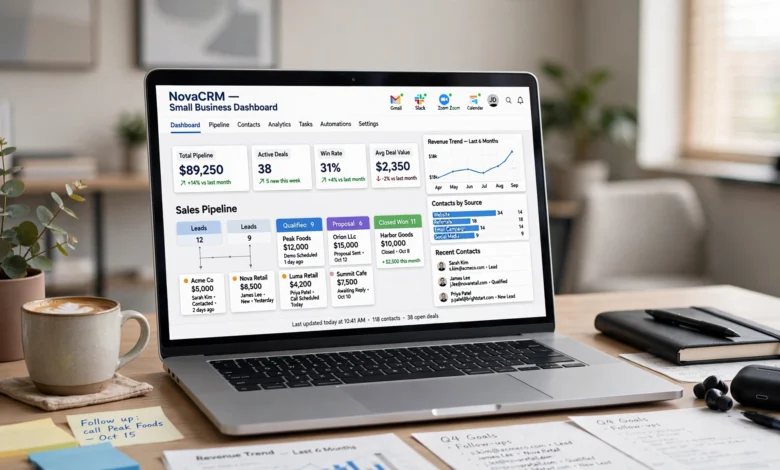
Picking the best CRM software for small businesses shouldn’t take a week of your life, but for most owners it does. You open five browser tabs, read ten “top 10” lists that all rank the same five tools in a different order, and end up more confused than when you started. That’s the problem this guide fixes.
A good CRM for small business teams isn’t the one with the longest feature list. It’s the one your team will actually open every day, that keeps your leads from falling through the cracks, and that doesn’t punish you with a $50-a-seat bill before you’ve hit ten customers. Some businesses need a dead-simple contact tracker. Others need pipeline automation, email sequencing, and reporting that can keep up with a growing sales team.
Below, I’ve broken down the best CRM software for small businesses based on pricing, ease of setup, automation depth, and how well each one actually fits a small team’s budget and bandwidth, not an enterprise sales floor. I’ll also cover how to evaluate CRM software on your own, what mistakes to avoid, and which features are genuinely worth paying for versus which ones are just marketing noise. By the end, you should be able to pick a small business CRM with confidence instead of just going with whatever showed up first in your search results.
What Is CRM Software, and Why Does a Small Business Need One?
CRM stands for customer relationship management. In plain terms, it’s software that keeps track of every person your business talks to, what was said, what’s owed, and what happens next. Instead of digging through email threads and sticky notes, everything lives in one place.
For a small business, a CRM system typically handles:
- Contact and company records, so you’re not hunting through your inbox for a phone number
- Deal or pipeline tracking, so you know exactly which leads are close to closing
- Task and follow-up reminders, so nobody forgets to call a lead back
- Email tracking and templates, so your team isn’t rewriting the same message every time
- Basic reporting, so you can see what’s actually working in your sales process
You don’t need a CRM because it’s trendy. You need one because a spreadsheet stops working the moment more than one person touches your sales process, or the moment you have more than about twenty active leads at once. That’s usually the tipping point where small teams start losing deals simply from disorganization, not from a bad pitch or a bad product.
How We Evaluated the Best CRM Software for Small Businesses
Before ranking anything, it helps to know what actually separates a good small business CRM from a bad one. Here’s the criteria used to build this list:
- Pricing transparency – no hidden fees, no forced annual contracts, and a usable free tier where possible
- Ease of setup – can a non-technical team member get it running in a day, not a month
- Core CRM features – contact management, pipeline tracking, task automation, and email integration
- Scalability – does it grow with you, or will you need to migrate again in a year
- Customer support – live chat, documentation, and response time when something breaks
- Integrations – does it connect to the tools you already use, like Gmail, Outlook, or QuickBooks
Every CRM on this list was judged against these six points, because a tool that scores high on features but low on ease of use just becomes shelfware. Nobody uses software they find confusing, no matter how powerful it is on paper.
The Best CRM Software for Small Businesses in 2026
1. HubSpot CRM – Best Free CRM for Small Business
HubSpot’s free plan is the most generous starting point in the industry, and it’s a big reason HubSpot keeps showing up at the top of nearly every best CRM software comparison. You get unlimited users, contact and deal tracking, email tracking, basic marketing tools, and a decent number of free marketing emails every month.
Why it works for small businesses:
- No cost to get started, and no credit card required
- Clean, intuitive interface that new hires can learn in an afternoon
- Strong integration with Gmail and Outlook
- Marketing, sales, and service tools all live under one roof, so you’re not stitching together three different platforms
Where it falls short: Paid tiers get expensive fast once you need advanced automation or custom reporting, and HubSpot now charges per seat for anyone doing more than viewing data. If you’re planning to scale your team quickly, budget for that jump ahead of time.
Best for: Businesses that want a genuinely free CRM to start with and don’t need heavy automation right away.
2. Zoho CRM – Best Value CRM for Growing Teams
Zoho consistently ranks as one of the best value options in the CRM software for small businesses category, and for good reason. The free plan supports up to three users, and paid tiers stay affordable even as you add features like AI-powered lead scoring through Zia, Zoho’s built-in assistant.
Standout features:
- Deep customization without enterprise-level pricing
- Workflow automation that’s genuinely easy to set up
- Wide integration library, including its own suite of business apps (Zoho Books, Zoho Desk, and so on)
- Multichannel support across email, phone, live chat, and social media
Where it falls short: The free plan’s storage limits can feel tight, and some users report slower support response times compared to paid competitors. The sheer number of settings and modules can also overwhelm a first-time user.
Best for: Small teams that have outgrown free tools and want serious customization without an enterprise price tag.
3. Bigin by Zoho – Best CRM for Very Small Teams
Bigin is Zoho’s stripped-down CRM, built specifically for tiny teams and solo operators who find full-scale CRM software overwhelming. It earned recognition as an Editors’ Choice pick for small business CRM tools, largely because of how quickly you can get it running.
Why it stands out:
- Pipeline-first design that mirrors how small sales teams actually think
- Flexible, easy-to-build dashboards
- Omnichannel communication built in
- Starts at a genuinely low per-user price
Where it falls short: It’s intentionally limited. If your business needs marketing automation or advanced reporting, you’ll outgrow Bigin faster than the other tools on this list.
Best for: Solopreneurs, freelancers, and teams under five people who want something simpler than full Zoho CRM.
4. Pipedrive – Best CRM for Sales-Focused Small Businesses
Pipedrive was built by salespeople, and it shows. The interface revolves entirely around a visual, drag-and-drop pipeline, which makes it one of the most intuitive tools for teams that live and breathe deal stages.
Standout features:
- Visual pipeline management that’s easy to customize per sales stage
- Built-in email tracking and templates
- Activity-based selling reminders that nudge reps toward their next action
- Solid mobile app for reps working outside the office
Where it falls short: Pipedrive is intentionally sales-focused, so it’s lighter on marketing and customer service tools compared to HubSpot or Zoho. If you need those features, you’ll likely need to add another tool alongside it.
Best for: Small sales teams that want a CRM built purely around closing deals, not managing marketing campaigns.
5. Freshsales – Best CRM for Built-In Communication Tools
Freshsales, from Freshworks, bakes AI directly into the day-to-day workflow. It can summarize a contact’s history, suggest next steps, and even help draft follow-up emails, which saves real time for small teams without a dedicated sales operations person.
Standout features:
- Multichannel communication (email, phone, chat, and SMS) built into one interface
- AI-driven deal insights that flag which leads are worth prioritizing
- Smart segmentation for marketing based on behavior and demographics
- Sales automation that assigns leads to the right rep automatically
Where it falls short: Freshsales’ more advanced AI features are locked behind higher-tier plans, so budget-conscious teams may only get a taste of what it can really do.
Best for: Small businesses that want communication and CRM data in a single window instead of juggling separate tools.
6. Salesforce Starter Suite – Best CRM for Long-Term Scalability
Salesforce built a reputation as the enterprise standard, but its Starter Suite is specifically designed to give smaller teams a simplified, ready-to-use version of that platform. It’s a strong pick if you want a system that won’t need to be replaced as you grow.
Standout features:
- Connects sales, marketing, and service data in one collaborative environment
- Generative AI tools that summarize customer history and draft personalized emails
- Extensive integration ecosystem, from accounting software to calendar apps
- Setup that takes minutes rather than weeks for the starter tier
Where it falls short: Salesforce’s full ecosystem can feel like overkill for a five-person team, and costs rise quickly once you move beyond the Starter Suite into more advanced Salesforce products.
Best for: Small businesses that expect fast growth and want a CRM they won’t outgrow in eighteen months.
7. Insightly – Best CRM for Project-Based Small Businesses
Insightly blends CRM functionality with basic project management, which makes it a strong fit for small businesses that don’t just close deals but also deliver ongoing projects afterward, think agencies, consultants, and service-based businesses.
Standout features:
- Built-in project management tied directly to closed deals
- Custom relationship linking, so you can map how contacts and companies connect
- Workflow automation for repetitive tasks
- Solid reporting dashboards even on lower-tier plans
Where it falls short: The interface isn’t as polished as some competitors, and new users often need a short learning curve before it clicks.
Best for: Service businesses that need to manage the client relationship both before and after the sale closes.
Comparison Table: Best CRM Software for Small Businesses
| CRM | Free Plan | Starting Paid Price | Best For |
|---|---|---|---|
| HubSpot CRM | Yes, generous | ~$15/seat/month | Free-forever starting point |
| Zoho CRM | Yes, up to 3 users | Budget-friendly | Value and customization |
| Bigin by Zoho | No | Very low per-user cost | Very small teams |
| Pipedrive | No, free trial only | Mid-range | Sales-only teams |
| Freshsales | Yes, limited | Mid-range | Built-in communication |
| Salesforce Starter | No, free trial only | Mid-to-high | Long-term scalability |
| Insightly | Limited | Mid-range | Project-based businesses |
Pricing changes often, so always confirm current numbers directly on each provider’s site before committing.
Key Features to Look for in a Small Business CRM
Not every CRM feature matters equally. Here’s what’s actually worth prioritizing when comparing the best CRM software for small businesses:
Contact and Pipeline Management
This is the non-negotiable core. You need a clear view of every contact, every deal stage, and where things stand at a glance. If a CRM makes this confusing, nothing else about it matters.
Automation
Look for tools that can automatically assign leads, send follow-up reminders, or trigger emails based on a trigger event. Automation is what actually saves time day to day, more than any dashboard or report.
Integrations
Your CRM needs to talk to the tools you already use, especially email, calendar apps, and accounting software. A CRM that lives in isolation creates more manual work, not less.
Mobile Access
Small business owners and reps are rarely chained to a desk. A capable mobile app matters more than people expect until they’re standing in a parking lot trying to log a call.
Reporting and Analytics
Even basic reporting, like win rates or average deal size, helps you understand what’s working. You don’t need enterprise-grade business intelligence, but you do need visibility.
Customer Support
When something breaks mid-sales-call, you want a real answer fast. Check whether live chat or phone support is included at your plan level before you sign up, not after.
Common Mistakes Small Businesses Make When Choosing a CRM
- Picking based on brand name alone. The most well-known CRM isn’t automatically the best fit for a five-person team.
- Ignoring the learning curve. A powerful tool nobody on your team wants to use is worse than a simple one everyone actually opens.
- Underestimating future costs. Free and entry-level plans often look great until you add three more users or unlock a feature you actually need.
- Skipping the data migration plan. Moving from spreadsheets or a different CRM takes real planning; don’t leave it for the last minute.
- Choosing based on features you’ll never use. Advanced AI scoring or predictive analytics sound impressive, but if your team is still figuring out basic pipeline hygiene, they’re not worth paying extra for yet.
How to Choose the Right CRM for Your Business
There’s no single best CRM software for small businesses that fits everyone, because the right answer depends entirely on how your business actually operates. A few questions worth asking before you commit:
- How big is your team right now, and how fast do you expect it to grow? A tool that’s perfect for two people can feel restrictive at fifteen.
- Is your priority sales, marketing, or customer service, or all three? Some tools specialize; others try to do everything.
- What’s your realistic monthly budget, twelve months from now, not just today?
- Do you need heavy automation, or just clean organization? Not every business needs AI-driven lead scoring on day one.
- What software are you already using that this needs to connect with?
Once you can answer those honestly, narrowing the list gets a lot easier. Most small businesses do well starting with a free or low-cost plan from a tool like HubSpot or Zoho, then upgrading once the team’s actual workflow becomes clear. According to Salesforce’s own research on customer relationship platforms, a modern CRM should function as a connected hub across sales, marketing, and service data in one collaborative environment, rather than sitting as an isolated database. That’s a useful benchmark to keep in mind, even if you start with the simplest plan available.
For a broader look at how CRM platforms are evaluated across categories and verified user reviews, Capterra’s small business CRM directory is a solid resource for comparing options side by side. And if you want a deeper dive into free-tier CRM tools specifically, HubSpot’s own CRM platform overview breaks down what’s included at each pricing level.
Frequently Asked Questions
What is the best free CRM for small businesses? HubSpot CRM is generally considered the strongest free option, thanks to unlimited users and a genuinely usable set of core features without a time limit.
How much should a small business budget for CRM software? Many small businesses start free and move into the $15 to $50 per user per month range once they need automation, integrations, or advanced reporting.
Can a small business run without a CRM? Technically yes, especially with under ten leads at a time, but most businesses start losing track of follow-ups and deals well before that point, which is usually when a CRM starts paying for itself.
Is Zoho CRM good for small businesses? Yes. Zoho is consistently ranked as one of the best value options for small businesses that need more customization than a basic free tool offers, without jumping to enterprise pricing.
How long does it take to set up a CRM? Simpler tools like Bigin or HubSpot’s free plan can be running within a day. More robust platforms like Salesforce typically take longer to fully configure, though starter tiers are designed to speed that up.
Conclusion
Choosing the best CRM software for small businesses really comes down to matching the tool to how your team actually works today, not the business you hope to be in three years. HubSpot and Zoho remain the strongest starting points for most small teams thanks to their free tiers and low learning curve, Pipedrive and Freshsales suit teams that want a sharper sales or communication focus, and Salesforce or Insightly make more sense once you’re planning for serious scale or project-based client work.
Whichever option you pick, prioritize ease of use and honest pricing over a long feature list, because the CRM that gets used every day will always outperform the one that just looks impressive in a demo.