Best Tablets for Students and Professionals
Looking for the best tablets for students and professionals in 2026? Compare top iPad, Galaxy Tab, and Windows picks for every budget.
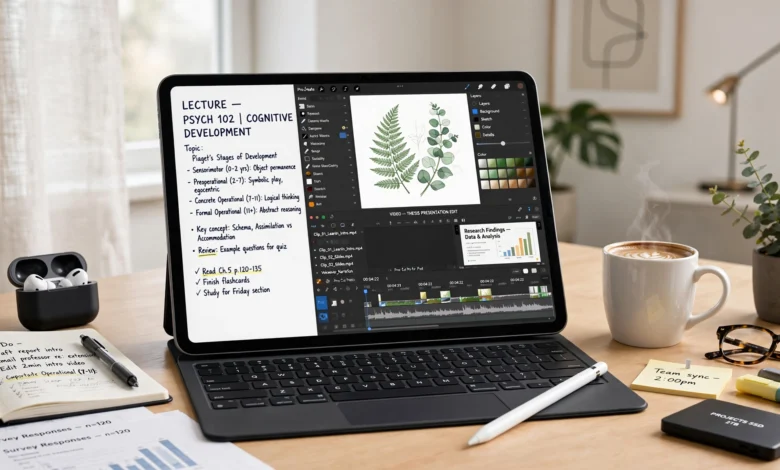
Finding the best tablets for students and professionals used to mean picking between “cheap and slow” or “expensive and overkill.” That’s not really true anymore. In 2026, there’s a genuinely good tablet at almost every price point, whether you’re taking notes in a lecture hall, editing a client deck on a train, or annotating PDFs between meetings.
The tricky part isn’t finding a decent tablet anymore. It’s figuring out which features actually matter for how you work. A pre-med student annotating anatomy diagrams needs something different than a marketing manager running spreadsheets and Zoom calls back to back. And a lot of “best tablet” roundups online just repeat the same three names without explaining why they’d fit your specific routine.
This guide breaks down the best tablets for students and professionals by use case: note-taking, battery life, multitasking, budget, and raw performance. We looked at iPads, Samsung’s Galaxy Tab lineup, Windows 2-in-1s, and a few budget options that punch above their price. Along the way, we’ll cover what actually matters when you’re shopping (screen size, stylus support, RAM, storage) so you’re not just buying based on a spec sheet you don’t fully understand. By the end, you should have a clear answer for which tablet fits your workload, your budget, and how long you plan to keep it.
How We Picked the Best Tablets for Students and Professionals
Before jumping into the list, it helps to know what we actually weighed when comparing these devices. Not every tablet needs to do everything well, but the strongest all-rounders tend to share a few traits.
Here’s what we prioritized:
- Battery life – anything under 9-10 hours of real-world use didn’t make the cut for a student or professional device
- Stylus and note-taking support – how natural handwriting feels, whether a pen is included, and app compatibility
- Multitasking ability – split-screen, windowed apps, and how well the tablet handles several open apps at once
- Build quality and portability – weight, durability, and how comfortable it is to carry between classes or meetings
- Software longevity – how many years of OS updates the manufacturer promises
- Price-to-performance – whether the tablet justifies its cost compared to similar options
We also read through real user feedback on forums like Reddit’s note-taking and tablet communities to see how these devices hold up outside of a controlled review environment, since marketing specs don’t always match daily use.
Best Tablets for Students and Professionals: Quick Picks
If you’re short on time, here’s the fast answer. We’ll go deeper on each pick below.
- Apple iPad Air (M4) – Best overall pick for students and professionals
- Apple iPad Pro (M4) – Best for creative professionals and power users
- Samsung Galaxy Tab S11 Ultra – Best Android tablet for multitasking
- Samsung Galaxy Tab S10 FE – Best value Android tablet
- Microsoft Surface Pro – Best for running full Windows apps
- OnePlus Pad Go 2 – Best mid-range option for students
- Samsung Galaxy Tab S6 Lite – Best budget note-taking tablet
- Lenovo Tab Plus – Best budget pick with included stylus
- Xiaomi Pad 8 – Best value-for-money Android alternative
- reMarkable Paper Pro 11.8 – Best distraction-free writing tablet
1. Apple iPad Air (M4): Best Overall Tablet for Students and Professionals
The iPad Air with the M4 chip is the tablet most people should buy if they want one device that handles school, work, and everything in between without compromise. It sits in that sweet spot between the affordable base iPad and the pricier iPad Pro, and for most students and professionals, that middle ground is exactly right.
Why it stands out:

- The M4 chip and 12GB of RAM handle multitasking, light video editing, and note-taking without slowing down
- Full compatibility with the Apple Pencil Pro, which adds tilt, pressure sensitivity, hover detection, and a squeeze gesture for switching tools
- The 11-inch Liquid Retina display is bright and color-accurate enough for design work or reading dense PDFs
- Apple Intelligence features, including writing assistance and smart search, are baked into the system
The main trade-off is that iPadOS still isn’t quite as flexible as a laptop when it comes to running true desktop-class software. If your work depends on specific desktop applications, that’s worth checking before you buy. But for note-taking, research, writing, and everyday productivity, the iPad Air is hard to beat, and it’s one of the most consistently recommended student and professional tablets across nearly every comparison guide published this year.
2. Apple iPad Pro (M4): Best for Creative Professionals
If your work leans heavily into video editing, digital art, or music production, the iPad Pro is worth the extra cost. It currently has the most processing power of any tablet on the market, paired with an Ultra Retina XDR display that makes color grading and photo editing genuinely enjoyable.
Standout features:
- Desk-class M4 processor that rivals many laptops for demanding creative work
- Wi-Fi 7 support for the fastest wireless speeds currently available on a tablet
- Compatible with the Magic Keyboard for a near-laptop typing experience
- Best-in-class display for anyone doing detailed visual work
One thing worth knowing: the iPad Pro can run warm during extended video exports or heavy rendering sessions. It’s not uncomfortable to hold, but it’s a sign you’re pushing the hardware hard. For students in art, film, or design programs, or working professionals in those fields, this is the tablet built for the job.
3. Samsung Galaxy Tab S11 Ultra: Best Android Tablet for Multitasking
For professionals who live in spreadsheets, presentations, and multiple browser windows, the Galaxy Tab S11 Ultra is the strongest Android option available. Its massive 14.6-inch AMOLED display makes side-by-side app use feel natural instead of cramped.
Key strengths:
- Samsung DeX mode turns the tablet into a desktop-like environment when paired with a keyboard
- S Pen included, with excellent handwriting accuracy for note-taking and annotation
- Ideal for professionals who need to run several apps at once without constant app-switching
- Large screen real estate makes it genuinely useful as a laptop replacement, not just a media device
This tablet is on the larger and pricier side, so it’s not the best fit if portability is your top priority. But for business professionals who want full multitasking power in a tablet form factor, it’s currently one of the best Android tablets for professionals you can buy.
4. Samsung Galaxy Tab S10 FE: Best Value Android Tablet
Not everyone needs the Ultra’s size or price tag. The Galaxy Tab S10 FE delivers most of the same core experience, including an included S Pen, at a fraction of the cost. It’s consistently ranked among the best budget-friendly picks for students who want an Android alternative to the iPad Air.
Why students like it:
- S Pen included at no extra cost, unlike many competitors that charge separately
- Reliable battery life for a full day of back-to-back classes
- Good balance of performance and price for essay writing, note-taking, and streaming lectures
- Works seamlessly if you already use a Samsung Galaxy phone
If your budget is tight and you use Android or Samsung devices elsewhere, this is one of the smartest tablets for students on the market right now.
5. Microsoft Surface Pro: Best for Full Windows Compatibility
Some students and most corporate professionals need software that simply doesn’t exist on iPadOS or Android. If your work requires the full desktop version of Microsoft Office, industry-specific software, or legacy Windows programs, the Surface Pro is the only tablet on this list that runs a genuine desktop operating system.
What makes it different:
- Runs full Windows 11, not a mobile or tablet-optimized version
- Functions as both a laptop and a tablet depending on the accessory setup
- Full compatibility with desktop-grade Excel, PowerPoint, and other business software
- A strong choice for corporate environments where IT departments standardize on Windows
The trade-off is battery life and weight. Windows tablets generally don’t match the battery efficiency of iPads or Android tablets, and the keyboard and pen accessories are sold separately, which adds to the overall cost. Still, for professionals who can’t compromise on software compatibility, it’s the clear pick.
6. OnePlus Pad Go 2: Best Mid-Range Pick for Students and Professionals
This is one of the more surprising entries on this list. The OnePlus Pad Go 2 refuses to compromise on quality despite sitting well below premium pricing, and its unique 7:5 aspect ratio actually makes multitasking feel more natural than most tablets in this price range.
Notable features:
- 12.1-inch, 2.8K display with a smooth 120Hz refresh rate
- OnePlus’ Open Canvas software handles side-by-side apps impressively well
- Battery life lasting over 16 hours in real-world testing, well ahead of many rivals
- Clear quad-speaker setup that holds up for both media and calls
For students and professionals trying to avoid premium iPad or Galaxy pricing without settling for a sluggish budget device, this is one of the better values available right now.
7. Samsung Galaxy Tab S6 Lite: Best Budget Note-Taking Tablet
If your main need is handwritten notes, PDF annotation, and light browsing, you genuinely don’t need to spend $600+. The Galaxy Tab S6 Lite covers the essentials at around $300, S Pen included.
Best suited for:
- Students who mainly need notes, reading, and light productivity
- Budget shoppers who still want a reliable stylus experience
- Anyone who wants a secondary device without paying flagship prices
The processor won’t win speed records, and the display isn’t AMOLED, but for the price, few tablets offer this complete a note-taking package.
8. Lenovo Tab Plus: Best Budget Pick With Included Stylus
Lenovo has quietly built a strong lineup for students on a budget. The Tab Plus includes a stylus and folio case in the box, which adds real value compared to competitors that charge extra for accessories.
Highlights:
- Dimensity processor handles multitasking, multiple PDFs, and browser tabs smoothly
- Quad JBL speakers with Dolby Atmos for lecture recordings and media
- 360Hz touch sampling stylus with minimal lag for handwriting
- Google Gemini AI integration for research, writing, and summarizing content
For students who want AI-assisted studying without paying for a premium device, this is one of the strongest Android options in its price class.
9. Xiaomi Pad 8: Best Value-for-Money Android Alternative
Xiaomi has built a reputation for offering more performance per dollar than almost anyone else in the tablet space, and the Pad 8 continues that trend. It steps up from the previous generation with a Snapdragon 8s Gen 4 chipset that performs well above its price point.
Why it’s worth considering:
- Flagship-adjacent performance at a mid-range price
- Smooth day-to-day use for browsing, streaming, and productivity apps
- A strong pick for students who want performance without Apple or Samsung pricing
It doesn’t have quite the same software polish or accessory ecosystem as the bigger brands, but for pure value, it’s tough to beat.
10. reMarkable Paper Pro 11.8: Best Distraction-Free Writing Tablet
Not every student or professional wants a tablet that also plays Netflix and buzzes with notifications. The reMarkable Paper Pro is built specifically for writing, and it delivers the closest experience to pen on paper you’ll find on a screen.
Best for:
- Writers, researchers, and professionals who want zero distractions
- Anyone who takes extensive handwritten notes and wants to convert them to text or searchable PDFs
- Users who already have a laptop or tablet for everything else and just need a dedicated writing device
The obvious limitation is that it’s a single-purpose device. You can’t run productivity apps, browse the web meaningfully, or stream video. If that trade-off doesn’t bother you, it’s one of the best focused writing tools available.
What to Look For When Choosing a Student or Professional Tablet
Picking from the best tablets for students and professionals above is easier once you understand which specs actually matter for your day-to-day use.
Screen Size and Portability
If you’re carrying your tablet from class to class or meeting to meeting, a lighter, more compact design matters more than raw screen size. An 11-inch tablet is generally the sweet spot for portability without feeling cramped. Larger 12- to 14-inch tablets are better suited for desk-based work, side-by-side note-taking, or anyone who prioritizes screen real estate over portability.
Battery Life
A tablet that dies halfway through your day isn’t useful, no matter how powerful it is. Look for devices that offer at least 10 hours of real-world battery life. Students should pay particular attention here, since a single school day often runs longer than a typical workday.
Stylus and Note-Taking Support
If handwritten notes are part of your routine, check whether the stylus is included or sold separately, and how responsive it feels. Features like pressure sensitivity, tilt detection, and low latency make a noticeable difference for handwriting quality, especially for students in STEM fields who need to sketch diagrams and equations.
RAM and Storage
- 8GB RAM is the minimum for smooth multitasking with several apps open
- 12GB RAM or more is ideal for heavier workloads like video editing or running multiple productivity apps simultaneously
- 128GB storage should be considered the baseline; lecture recordings, PDFs, and project files fill up space faster than most people expect
- 256GB or higher is worth the upgrade if you plan to store a lot of media or large files locally
Operating System and Ecosystem
Your existing devices matter more than most buying guides mention. If you already use an iPhone, an iPad keeps everything connected through iMessage, AirDrop, and shared apps. If you’re on an Android phone, particularly a Samsung device, a Galaxy Tab will sync more seamlessly. If your work requires specific desktop software, a Windows tablet like the Surface Pro may be the only option that actually works for you.
Software Longevity
Students in particular tend to keep a tablet for three to four years or longer. Check how many years of software updates the manufacturer commits to, since a tablet that stops receiving updates after two years will feel outdated well before you’re ready to replace it.
Tablets for Students vs. Tablets for Professionals: Key Differences
While there’s plenty of overlap, students and professionals often prioritize different things when shopping for a tablet.
Students should focus on:
- Affordability and long-term value across a multi-year degree
- Lightweight design for carrying between classes
- Reliable stylus support for note-taking and annotation
- Compatibility with common education apps and cloud storage
Professionals should focus on:
- Performance for multitasking and running work-specific software
- Larger displays for productivity and presentations
- Compatibility with existing work tools, whether that’s Microsoft 365, Google Workspace, or industry software
- Accessories like keyboards and styluses that turn the tablet into a genuine laptop replacement
According to <cite index=”4-1″>Tech Radar’s tablet buying advice, professionals doing more serious work on a tablet should weigh how well the device handles multiple open apps or pro-level software before deciding between an iPad and an Android option</cite>. That’s a useful gut check regardless of which brand you’re leaning toward.
Frequently Asked Questions
What is the best tablet overall for students and professionals in 2026? The Apple iPad Air (M4) is the strongest all-around choice for most people, balancing performance, price, and stylus support. If you need more raw power for creative work, the iPad Pro is worth the upgrade.
Is an iPad or Android tablet better for note-taking? Both handle note-taking well. The iPad Air with Apple Pencil Pro offers the most refined writing feel, while Samsung’s Galaxy Tab lineup with the S Pen offers similar quality with more flexible multitasking through DeX mode.
Do I need a Windows tablet for work? Only if your job specifically requires desktop-only software that doesn’t have an iPad or Android equivalent. Otherwise, an iPad or Galaxy Tab will handle most professional tasks just fine.
How much storage do I actually need? 128GB is a safe minimum for most students and professionals. If you store a lot of video, large design files, or offline media, consider 256GB or higher.
Are budget tablets good enough for school or work? Yes, for many use cases. Devices like the Galaxy Tab S6 Lite or Lenovo Tab Plus cover note-taking, reading, and light productivity well. Just be realistic about their limits if you plan to run heavier apps or multitask constantly. For a broader look at how mid-range hardware performs against flagship devices, <cite index=”2-1″>Tech Advisor’s tablet rankings note that models priced below $300 still offer bright displays and long battery life for everyday use, while pricier options make more sense if you need serious multitasking performance</cite>.
Final Thoughts
There’s no single “best” tablet that works for everyone, and honestly, that’s a good thing. The best tablets for students and professionals in 2026 span a wide enough range that almost anyone can find something that fits their workflow and budget. If you want one device that does everything reasonably well, the iPad Air is the safest bet.
If your work leans creative or performance-heavy, the iPad Pro or Galaxy Tab S11 Ultra will serve you better. And if money is tight, the Galaxy Tab S6 Lite or Lenovo Tab Plus prove that you don’t need to spend a fortune to get a genuinely useful tablet. Whatever you choose, matching the device to how you actually work, not just what looks impressive on a spec sheet, is what will make it worth the money.