Top Time-Tracking Apps for Freelancers
Compare the best time-tracking apps for freelancers in 2026, from Toggl to Harvest, and pick the right tool to log hours and bill clients faster.
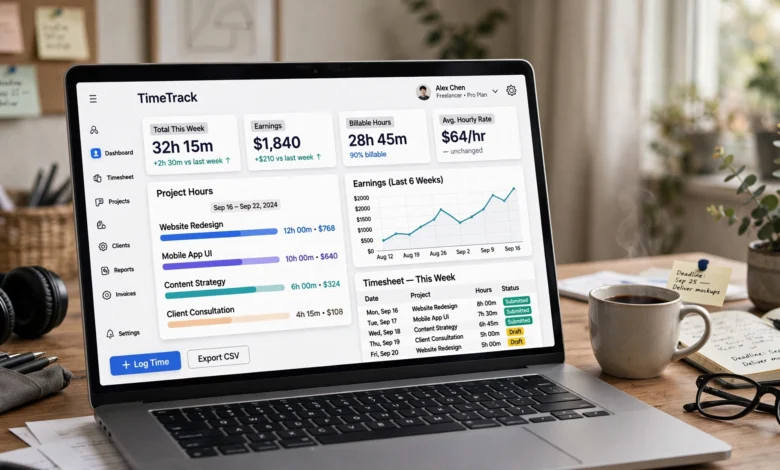
If you freelance for a living, you already know the strange math of the job: you get paid for hours, but nobody hands you a time clock to punch. You’re the one who has to remember when you started that logo design, how long the client call ran, and whether the “quick fix” actually took twenty minutes or ninety. That’s exactly why time-tracking apps for freelancers exist, and why picking the right one can quietly change how much money you make each month.
This isn’t a small thing. A few years into freelancing, most people realize they’ve been underbilling themselves for ages. You work through a task, get pulled into email, jump on a call, and by the time you look up, half the afternoon is gone and you can only guess how much of it was billable. A good freelance time tracking app closes that gap. It turns fuzzy memory into a real record you can hand to a client, attach to an invoice, or use to figure out which projects are actually worth your time.
In this guide, we’ll walk through what actually matters when you’re choosing a time tracking app for freelancers, break down nine of the best options on the market right now, and help you match a tool to how you actually work, not how a marketing page says you should work. By the end, you’ll know exactly which app fits your workflow, your budget, and your clients.
Why Time Tracking Matters for Freelancers
Before comparing tools, it’s worth being honest about why this matters. Freelancers don’t lose money because they’re lazy. They lose money because unstructured time is invisible, and invisible time doesn’t get billed.
Here’s what’s really at stake when you skip proper time tracking:
- Underbilling clients because you round down “just to be safe,” which quietly costs you real income over a year.
- Scope creep going unnoticed since you can’t prove a project ballooned past what was quoted.
- Poor rate decisions, because you don’t actually know how long tasks take, so your hourly rate is a guess dressed up as a number.
- No proof of work when a client questions an invoice or asks for a breakdown.
- Burnout blind spots, since you can’t see that you’re working 55 hours a week until it’s already happened.
A reliable time-tracking app for freelancers fixes all of this by turning your workday into data. That data becomes your invoice backup, your negotiating leverage when a client tries to renegotiate scope, and honestly, your reality check when you think you’ve been “just a little busy” and the numbers say otherwise.
What to Look for in a Time-Tracking App for Freelancers
Not every time tracker is built with solo workers in mind. Plenty of the big names on the market are designed first for teams and managers, and freelancers get bolted on as an afterthought. Here’s what actually matters when you’re evaluating options.
Ease of Use and Low Friction
The best time tracking software for freelancers is the one you’ll actually open every day. If starting a timer takes four clicks and a mental negotiation with yourself, you’ll stop doing it within a week. Look for a one-click timer, a simple mobile app, and a browser extension that starts tracking from wherever you’re already working, whether that’s Trello, Gmail, or a project management tool.
Automatic Time Tracking
Manual timers assume you remember to hit start and stop, and most freelancers don’t, especially on days packed with small interruptions. Automatic tracking runs quietly in the background, logging app and website activity so you can reconstruct your day later instead of guessing. This is especially useful for anyone who does a lot of context-switching between client work, admin, and communication.
Billable vs. Non-Billable Hours
A serious freelancer time tracking app should let you tag time as billable or non-billable at a glance. This single feature does more for your income than almost anything else on this list, because it forces you to see exactly how much of your day is actually generating revenue versus how much is going to email, invoicing, and other unpaid overhead.
Multi-Client and Multi-Project Organization
If you juggle more than one client, which most freelancers do, you need a tool that separates time by client and project cleanly. Confusing one client’s hours with another’s is an easy way to damage trust, and it makes your own reporting useless.
Invoicing and Payment Integration
Some tools stop at tracking; others carry your hours straight through to an invoice, sometimes with online payment links built in. If you’re tired of copying numbers from a spreadsheet into an invoicing app, look for time tracking software with invoicing built in, or at least a clean export to whatever billing tool you already use.
Reporting and Profitability Insights
Good reports tell you which clients pay well relative to the time they take, and which ones quietly drain your hours for the money. This is where time tracking for freelancers turns from a compliance chore into an actual business tool.
Cross-Platform Availability
You should be able to track time from your laptop, your phone, and ideally a browser extension, since freelance work rarely happens in one place. A tool that’s strong on desktop but weak on mobile will leave gaps in your record every time you step away from your desk.
Fair Pricing for Solo Users
Many time trackers price per seat, which is fine for agencies but can feel steep for one person. Look closely at the free tier and the first paid tier, since that’s usually where freelancers actually live.
Top Time-Tracking Apps for Freelancers in 2026
Here’s a rundown of the strongest time-tracking apps for freelancers on the market today, based on what they actually do well and where they fall short.
1. Toggl Track
Toggl Track has been a default recommendation for freelancers for years, and it’s held that position because it doesn’t overcomplicate the basics. You type what you’re working on, hit the timer, and you’re tracking. Its browser extension plugs into dozens of other tools, so a “start timer” button often shows up right inside apps like Trello or Asana without you needing to switch tabs.
Key features:
- One-click timer with a clean, distraction-free interface
- Project profitability and billable rate reporting
- Idle detection so you’re not billing time you weren’t actually working
- Wide integration library, including browser extensions
Best for: Freelancers who want a fast, no-friction manual timer with strong reporting and don’t need built-in invoicing.
Worth knowing: Toggl’s mobile experience is noticeably lighter than its desktop and web apps, and invoicing sits behind higher-tier plans. You can read more about its feature set directly on Toggl’s official site.
2. Harvest
Where Toggl focuses on tracking, Harvest focuses on getting you paid. It pairs project time tracking with built-in invoicing and online payment links, which is why so many solo consultants stick with it long-term. Budget alerts flag when a project is creeping past its quoted hours, so you catch scope creep before it eats your margin.
Key features:
- Time tied directly to project budgets, with automatic alerts
- Built-in invoicing with online payment collection
- Expense tracking alongside time entries
- Integrations with common project management tools
Best for: Freelancers who want time tracking and invoicing in one place instead of juggling two separate apps. Full plan details are available on Harvest’s pricing page.
3. Clockify
Clockify built its reputation on a genuinely usable free plan, offering unlimited users and projects at no cost, which makes it a favorite for freelancers on a tight budget. It supports manual timers, timesheets, and CSV or Excel exports, along with kiosk mode and GPS tracking if you occasionally work on-site.
Key features:
- Free plan with no user or project caps
- Manual and automatic timer options
- Timesheet and reporting exports
- Optional GPS tracking for on-site work
Best for: Budget-conscious freelancers who want core time tracking without paying for extras they won’t use. Note that some advanced features, including certain reports and QuickBooks integration, sit behind paid tiers.
4. RescueTime
RescueTime takes a different approach entirely. Instead of asking you to start and stop timers, it automatically tracks the apps and websites you use, then scores your day for focus and productivity. For freelancers whose billable work happens entirely on a screen, this removes the “I forgot to start the timer” problem completely.
Key features:
- Fully automatic background tracking
- Focus and distraction scoring
- Weekly productivity reports
- Website and app blocking during focus sessions
Best for: Digital-first freelancers, like writers, developers, and designers, who spend most of their billable hours at a computer. It’s a poor fit if your work involves client calls, site visits, or offline tasks, since none of that gets captured automatically.
5. Hubstaff
Hubstaff leans more toward contractors and small agencies, but plenty of solo freelancers use it for its combination of time tracking, optional screenshots, and GPS location tracking. It’s a heavier tool than most freelancers strictly need, but if you want proof-of-work documentation for skeptical clients, it delivers.
Key features:
- Optional screenshots and activity levels
- GPS tracking for field-based work
- Payroll and invoicing add-ons
- Detailed timesheets for client reporting
Best for: Freelancers who need to provide detailed proof of work to clients, or who occasionally manage subcontractors themselves.
6. Everhour
Everhour is built to sit on top of the project management tool you already use rather than replace it. It integrates tightly with platforms like Asana, Trello, and ClickUp, adding time tracking directly into your existing task cards.
Key features:
- Deep integration with popular project management tools
- Budget tracking against project estimates
- Simple invoicing for hourly and fixed-price work
- Visual reports on team and project time
Best for: Freelancers who already manage their work inside a task board and don’t want a separate app pulling their attention away from it.
7. TimeCamp
TimeCamp combines automatic and manual tracking with a strong free tier for individual users. It also includes basic invoicing and attendance tracking, making it a reasonably complete option for freelancers who want more than a bare-bones timer without paying agency-level prices.
Key features:
- Automatic time tracking with keyword-based project detection
- Free plan for unlimited users with core features
- Built-in invoicing
- Detailed timesheets and approval workflows
Best for: Freelancers who want a hybrid of automatic and manual tracking without moving to a premium plan right away.
8. FreshBooks Time Tracking
FreshBooks is primarily accounting software, but its built-in time tracking makes it worth mentioning for freelancers who want everything, hours, invoices, and expenses, in a single subscription rather than stitching together separate tools.
Key features:
- Time tracking tied directly to invoicing and accounting
- Client and project-based organization
- Mobile app for tracking on the go
- Expense and mileage tracking alongside time
Best for: Freelancers who’d rather manage their whole business, not just their hours, in one platform.
9. TMetric
TMetric rounds out this list as a lighter-weight, budget-friendly option that still covers the essentials: manual and automatic tracking, billable rates, and simple reporting. It doesn’t try to be everything, which is exactly the appeal for freelancers who find bigger tools overwhelming.
Key features:
- Simple manual and automatic timers
- Billable rate calculation per project
- Browser extension for popular web apps
- Straightforward, uncluttered reporting
Best for: Freelancers who want a no-frills tool that covers the basics without a steep learning curve.
Free vs. Paid Time-Tracking Apps: Which Should Freelancers Choose
Most freelancers start on a free plan, and honestly, that’s usually the right call while you’re testing what actually fits your workflow. Free tiers from Clockify, Toggl Track, and TimeCamp cover the core need for most solo workers: starting a timer, tagging a project, and pulling a basic report.
Where paid plans earn their cost is usually one of these areas:
- Invoicing built directly into the app, so you’re not manually transferring hours into a separate billing tool.
- Advanced reporting, like profitability by client or detailed time audits.
- Integrations with accounting software such as QuickBooks.
- Proof-of-work features, like screenshots or GPS logs, which matter more if clients specifically request documentation.
A reasonable rule of thumb: if you’re tracking time purely for your own records and rough invoicing, a free plan is probably enough. If you’re managing several ongoing clients, need airtight billing records, or want automated reports that save you an hour of admin every week, it’s worth paying for the upgrade. The math is simple, if the app saves you even thirty minutes of admin a week, it pays for itself many times over against a typical freelance hourly rate.
How to Choose the Right Time-Tracking App for Your Freelance Business
There’s no single “best” tool here, only the best fit for how you work. Use this quick checklist to narrow things down:
- If you want the simplest possible manual timer: go with Toggl Track or TMetric.
- If invoicing matters as much as tracking: choose Harvest or FreshBooks.
- If budget is your main constraint: Clockify’s free plan is hard to beat.
- If you never remember to start a timer: RescueTime’s automatic tracking removes that problem entirely.
- If clients ask for proof of hours worked: Hubstaff’s screenshot and activity features cover that need.
- If you live inside a project management tool already: Everhour keeps everything in one place.
It also helps to think about how the IRS and other tax authorities expect self-employed workers to document their business activity. Keeping detailed, timestamped records of client work isn’t just good practice for invoicing, it also supports your records if you ever need to substantiate business income or expenses. The IRS guidance for self-employed individuals is a useful reference if you want to understand what kind of documentation is expected.
Tips to Get the Most Out of Your Time-Tracking App
Picking the right tool is only half the job. Here’s how to actually make it stick:
- Track everything for two weeks, even the small stuff. You’ll be surprised how much time disappears into email, admin, and “quick” client messages once you see it laid out.
- Tag time as billable or non-billable from day one. Retroactively sorting entries is tedious and you’ll skip it.
- Set a weekly review habit. Ten minutes on a Friday looking at your report tells you more about your business than most quarterly check-ins.
- Use idle detection if your app offers it. It keeps your billed hours honest and protects your credibility with clients.
- Export your reports before invoicing, not after, so you can catch discrepancies before a client sees them.
- Revisit your rate every few months based on what your tracked hours actually show about project profitability, not what you guessed when you started.
Frequently Asked Questions
What is the best free time-tracking app for freelancers?
Clockify is generally considered the strongest free option, offering unlimited projects and users at no cost, though some advanced reporting and integrations require a paid upgrade.
Do freelancers really need a time-tracking app?
If you bill by the hour, yes, almost without exception. Even fixed-rate freelancers benefit from tracking time, since it reveals whether a project is actually profitable at the rate quoted.
Can a time-tracking app replace invoicing software?
Some can. Harvest and FreshBooks both combine time tracking with invoicing, so you can go from logged hours to a sent invoice without switching tools. Others, like Toggl Track and Clockify, focus on tracking and expect you to export data into a separate billing tool.
Is automatic time tracking better than manual timers?
Neither is universally better, it depends on your work style. Automatic tracking, like RescueTime uses, is great for screen-based work but misses calls, meetings, and offline tasks. Manual timers give you more control but only work if you’re disciplined about starting and stopping them.
How much do time-tracking apps typically cost for freelancers?
Most paid plans for solo users fall somewhere between $8 and $15 per month, though many freelancers get by comfortably on free tiers, especially early on when project volume is lower.
Conclusion
Choosing the right time-tracking app for freelancers isn’t just about logging hours, it’s about protecting your income, proving your value to clients, and finally seeing where your workday actually goes instead of guessing at the end of the month. Whether you land on Toggl Track for its simplicity, Harvest for its invoicing, Clockify for its free plan, or RescueTime for hands-off automatic tracking, the goal is the same: stop losing billable hours to bad memory and start running your freelance business on real data.
Try a couple of the tools on this list for a week each, pay attention to which one you actually keep open, and build your invoicing habits around it. That small change alone tends to pay for itself faster than most freelancers expect.