What Is Two-Factor Authentication and Why Use It
Two-factor authentication adds a second check to your logins. Here is how 2FA works, the main types, and why it protects your accounts from hackers.
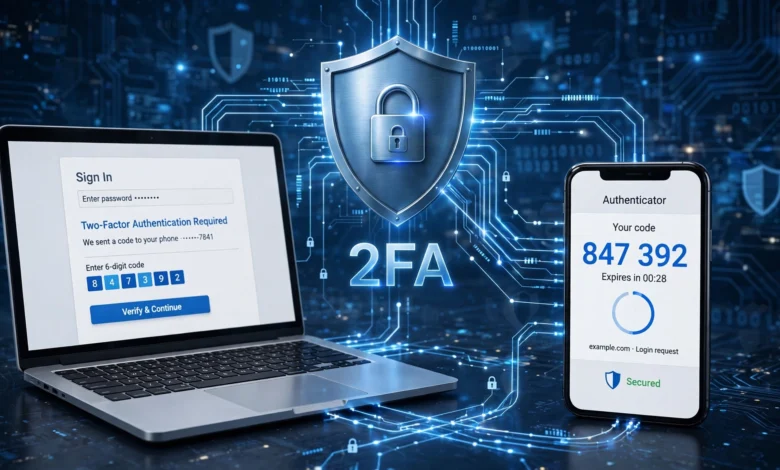
Two-factor authentication is one of the simplest ways to protect your online accounts, yet many people still skip it because it sounds technical or annoying. The idea is easy to understand. Instead of relying on a password alone, you prove who you are in two different ways before you can log in. Usually that means something you know, like your password, plus something you have, like your phone.
Why does this matter so much? Passwords are weaker than most of us would like to admit. People reuse them across sites, pick ones that are easy to guess, and hand them over to convincing fake login pages without realizing it. Every year, billions of stolen usernames and passwords end up for sale online. If your password is in one of those leaks, a criminal can walk right into your email, bank account, or social media profile.
That is where 2FA changes the game. Even if someone has your password, they still need the second factor, and that is much harder to steal. It turns an easy break-in into a frustrating dead end for most attackers.
In this guide, you will find a plain explanation of what two-factor authentication is, how it works behind the scenes, the different methods available, and seven solid reasons to turn it on today. You will also see its limits, how to set it up, and a few habits that make it even stronger. By the end, you should feel confident protecting every account that matters to you.
What Is Two-Factor Authentication?
Two-factor authentication, often shortened to 2FA, is a security process that asks you for two separate types of proof before granting access to an account. Your password is the first proof. The second is something extra, like a code sent to your phone, a tap on an app notification, or a fingerprint scan.
Think of it like a bank vault that needs two keys held by two different people. One key alone does nothing. Both are needed to open the door. With two-factor authentication, a stolen password is only half of what an attacker needs, so it becomes far less valuable.
The concept is not new. You have used it for years without calling it that. When you withdraw cash from an ATM, you need your physical card (something you have) and your PIN (something you know). Online 2FA applies the same logic to your digital accounts.
The Three Authentication Factors
Security experts group proof of identity into three main categories. Real two-factor authentication combines two different categories, not two items from the same one.
- Something you know: A password, PIN, or answer to a security question. This is the most common factor and also the easiest to steal or guess.
- Something you have: A phone, a hardware security key, a smart card, or a code-generating device. An attacker would need physical access to this item or a way to hijack it.
- Something you are: Biometric traits such as your fingerprint, face, or voice. These are unique to you and hard to copy.
Here is a detail many people miss. A password plus a security question is not true two-factor authentication, because both are things you know. If a hacker phishes your password, they can often phish your security answer in the same fake form. Mixing categories is what makes 2FA strong.

How Two-Factor Authentication Works
The process behind two-factor authentication is quick, usually adding only a few seconds to your login. Here is what typically happens:
- You enter your username and password. The service checks whether they match what it has on file.
- The service asks for a second factor. Instead of logging you in right away, it pauses and requests extra proof.
- You provide the second factor. This might be a six-digit one-time password from an authenticator app, a code sent by text, a push notification you approve, or a security key you plug in or tap.
- The service verifies it. If the second factor is correct and still valid, you are logged in.
- Optional: you trust the device. Many services let you mark a personal device as trusted, so you are not asked for the second factor every single time on that device.
The key point is that the second factor is either temporary or tied to a physical object. One-time codes usually expire in 30 to 60 seconds. A hardware key cannot be copied over the internet. That is why stealing a password alone no longer works.
Types of Two-Factor Authentication Methods
Not all 2FA methods offer the same level of protection. Some are more convenient, while others are much harder to beat. Knowing the differences helps you pick the right one for each account.
SMS and Text Message Codes
With SMS verification, the service texts a short code to your phone number, and you type it in after your password. It is the most familiar method because almost everyone has a phone that can receive texts.
Pros:
- Easy to set up and use
- Works on basic phones without apps
- Much better than having no two-factor authentication at all
Cons:
- Vulnerable to SIM swapping, where a criminal convinces your carrier to move your number to their SIM card
- Codes can be intercepted in some cases
- Does not work well without cell signal
SMS is a reasonable starting point, but you should upgrade to a stronger option for important accounts when possible.
Authenticator Apps
An authenticator app such as Google Authenticator, Microsoft Authenticator, Authy, or the built-in password managers on many phones generates a fresh six-digit code every 30 seconds. This is called a time-based one-time password (TOTP). The app and the service share a secret key during setup, so both can calculate the same code without sending anything over the network.
Pros:
- Not tied to your phone number, so SIM swapping does not affect it
- Works offline
- Free and widely supported
Cons:
- If you lose your phone without backup codes, recovery can be a hassle
- Still possible to phish if you type the code into a fake website
For most people, an authenticator app is the sweet spot between strong security and everyday convenience.
Push Notifications
Some services send a prompt to an app on your phone asking, “Is this you trying to sign in?” You tap Approve or Deny. Many newer versions also show a number on your screen that you must match in the app.
Pros:
- Very quick and convenient
- Often shows the location and device requesting access
Cons:
- Vulnerable to “MFA fatigue,” where attackers send dozens of prompts hoping you tap Approve just to make them stop
Number matching has made push-based two-factor authentication much safer, so choose that option if your service offers it.
Hardware Security Keys
A hardware security key is a small USB, NFC, or Bluetooth device, such as a YubiKey or Google Titan Key. You plug it in or tap it against your phone to confirm your login. These keys use standards called FIDO2 and WebAuthn.
Pros:
- The strongest widely available form of 2FA
- Resistant to phishing attacks because the key checks that the website is genuine before responding
- No codes to type
Cons:
- Costs money, usually between $20 and $70
- You need to keep a backup key in case you lose one
- Not every service supports them yet
If you manage sensitive information, run a business, or are a likely target for attackers, a security key is worth every penny.
Biometric Verification
Biometric login verification uses your fingerprint, face, or sometimes voice. On its own it often unlocks a device, but combined with a password or a device you own, it becomes part of a strong two-factor authentication setup. Passkeys, which are growing fast, often use your device plus a biometric check.
Pros:
- Fast and hard to fake
- Nothing to remember
Cons:
- You cannot change your fingerprint if the data is ever compromised
- Can fail with wet fingers, poor lighting, or injuries
Email Codes
Some services send a code to your email address. This counts as a second step, but it is only as secure as your email account. If an attacker controls your inbox, this protection falls apart. Use email codes only when nothing better is offered, and make sure your email itself has strong 2FA.
7 Powerful Reasons to Use Two-Factor Authentication
Now for the part that matters most. Here is why turning on two-factor authentication is one of the smartest things you can do for your online security.
1. It Stops Most Account Takeovers
The numbers here are striking. Microsoft has reported that using multi-factor authentication can block over 99.9 percent of automated account compromise attacks. Google’s own research found similar results, showing that even a simple phone-based check blocked the vast majority of bot attacks and bulk phishing attempts.
Very few security measures deliver that much protection for so little effort. Two-factor authentication is close to a free upgrade for your accounts.
2. It Protects You When Passwords Leak
Data breaches happen constantly, and you have no control over how well a company stores your password. If a site you used years ago gets hacked, your password may already be circulating online. Criminals then try that same password on other sites, a technique called credential stuffing.
With 2FA turned on, a leaked password is not enough. The attacker hits a wall at the second step, and your account stays locked.
3. It Reduces the Damage from Phishing
Phishing attacks trick you into entering your login details on a fake website that looks real. Even careful people fall for well-made ones. Two-factor authentication adds a layer the attacker still has to get past.
Stronger methods like hardware keys and passkeys go even further, because they will not work on a fake domain at all. That makes phishing attacks far less effective against you.
4. It Protects Your Email, the Key to Everything
Your email account is the master key to your digital life. Almost every other service lets you reset your password through email. If someone takes over your inbox, they can reset your bank, shopping, and social media passwords in minutes.
Turning on two-factor authentication for your email should be your very first step. It protects that master key and, by extension, everything connected to it.
5. It Alerts You to Suspicious Activity
Here is a benefit people often overlook. If you suddenly receive a 2FA code or login prompt you did not request, that is a warning sign. It means someone has your password and is trying to get in.
That alert gives you a chance to change your password right away, before any real damage is done. Without two-factor authentication, you might never know until it was too late.
6. It Helps Businesses Meet Security Requirements
For companies, 2FA is no longer optional. Many regulations, industry standards, and cyber insurance policies now expect or require it. Frameworks like PCI DSS for payment data and many data protection rules point toward strong login verification.
Using two-factor authentication across employee accounts protects customer data, reduces the risk of costly breaches, and shows clients that you take account security seriously.
7. It Is Free and Easy to Use
Most major platforms offer two-factor authentication at no cost. Authenticator apps are free, and setup usually takes less than five minutes per account. After the first few days, the extra step becomes a habit you barely notice.
When you compare a few seconds per login against the stress of a hacked bank account or a stolen identity, the trade is an easy one.
Two-Factor Authentication vs Multi-Factor Authentication
You will often see the terms two-factor authentication and multi-factor authentication (MFA) used side by side. They are closely related, but there is a small difference.
- Two-factor authentication always uses exactly two factors.
- Multi-factor authentication uses two or more factors. So all 2FA is a type of MFA, but MFA can include three or more layers.
For example, a high-security system might require a password, a hardware security key, and a fingerprint. That is MFA with three factors. For everyday personal use, 2FA gives you most of the benefit without extra complexity.
The U.S. Cybersecurity and Infrastructure Security Agency offers a helpful guide to multi-factor authentication that explains why agencies and businesses are pushing it so hard. For a deeper technical view, the NIST Digital Identity Guidelines (SP 800-63B) describe how different authenticators are rated for strength.
Is Two-Factor Authentication Completely Safe?
No security tool is perfect, and it is better to know the weak spots than to feel falsely safe. Two-factor authentication makes attacks much harder, but determined criminals have found a few ways around weaker methods.
SIM Swapping
As mentioned earlier, attackers sometimes trick mobile carriers into moving your phone number to a SIM they control. Once they have your number, they receive your SMS verification codes. You can reduce this risk by adding a PIN or port-out lock with your carrier and using an authenticator app instead of text codes.
Real-Time Phishing
Some advanced phishing kits sit between you and the real website, passing your password and your one-time password along instantly. This is why phishing-resistant methods like hardware keys and passkeys are becoming the gold standard.
MFA Fatigue Attacks
Attackers with your password may flood your phone with push notifications, hoping you approve one by accident or out of annoyance. The rule is simple: never approve a login request you did not start. If prompts keep coming, change your password immediately.
Account Recovery Loopholes
Sometimes the weakest link is the “forgot password” or “lost my device” process. If a service lets anyone bypass 2FA with a simple email or a few personal questions, attackers will target that path instead. Keep your recovery options secure and up to date.
Even with these risks, two-factor authentication is dramatically safer than a password alone. Most criminals go after easy targets, and 2FA makes you a much harder one.
How to Set Up Two-Factor Authentication
Setting up 2FA looks slightly different on every platform, but the general steps are almost always the same.
- Open your account settings. Look for a section called Security, Privacy, Login, or Sign-in and Security.
- Find the two-factor option. It may be labeled “Two-Step Verification,” “2-Step Verification,” “Login Approvals,” or “Multi-Factor Authentication.”
- Choose your method. Pick an authenticator app or security key if available. Use SMS only if nothing else is offered.
- Link your device. For an app, you will usually scan a QR code. For a key, you will plug it in or tap it when prompted.
- Enter the verification code. This confirms the setup worked.
- Save your backup codes. Most services give you a set of one-time recovery codes. Print them or store them in a password manager. Do not skip this step.
- Add a second method if possible. A backup key or second device keeps you from being locked out.
Once set up, try logging out and back in to make sure everything works before you need it in a hurry.
Best Practices for Stronger Account Security
Two-factor authentication works best as part of a wider set of good habits. These tips help you get the most out of it.
- Use a password manager. Unique, strong passwords for every site mean one breach cannot unlock the rest. Many managers also store one-time password codes.
- Prefer app-based or hardware methods. Move away from SMS for your most important accounts.
- Keep backup codes somewhere safe. A locked drawer or an encrypted vault works well. Your phone alone is not a backup.
- Register more than one security key. Keep one on your keychain and one at home.
- Never share your codes. No real company, bank, or support agent will ever ask you for a 2FA code. Anyone who does is running a scam.
- Review trusted devices regularly. Remove old phones, work computers, and devices you no longer use.
- Update your recovery information. An old phone number or abandoned email can become a backdoor.
- Consider passkeys. Many services now support passkeys, which combine your device and biometrics into a login that resists phishing by design.
Which Accounts Should Get 2FA First?
If turning on two-factor authentication everywhere feels overwhelming, start with the accounts that would cause the most damage if stolen. Here is a practical order:
- Primary email account. It controls password resets for nearly everything else.
- Banking and financial apps. Including PayPal, investment platforms, and crypto wallets.
- Password manager. It holds the keys to all your other accounts.
- Cloud storage. Google Drive, iCloud, OneDrive, and Dropbox often contain personal documents and photos.
- Social media accounts. Hijacked profiles are used to scam your friends and family.
- Work accounts. Business email, Slack, and admin panels are prime targets.
- Shopping sites with saved payment details. Amazon and similar stores.
Work through this list over a weekend, and you will have covered your most valuable accounts with strong account security.
Frequently Asked Questions About Two-Factor Authentication
Is 2FA the same as two-step verification?
In everyday use, yes. Some companies, like Google, use the term “2-Step Verification” for the same idea. Technically, two-step verification could mean two steps from the same factor category, but most modern versions follow true two-factor authentication principles.
What happens if I lose my phone?
Use your saved backup codes or a second registered device to log in, then remove the lost phone from your account and set up 2FA on your new one. This is exactly why saving backup codes matters.
Does two-factor authentication slow things down?
Only slightly. Most logins add five to ten seconds, and trusted devices often skip the second step for a while. It is a small cost for a large gain in online security.
Can hackers bypass two-factor authentication?
It is possible with advanced techniques, especially against SMS codes. But it takes much more effort, and most attackers move on to easier targets. Using an authenticator app or security key closes most of these gaps.
Conclusion
Two-factor authentication is one of the most effective and affordable ways to protect your online life, because it adds a second layer of proof that stolen passwords alone cannot unlock. By combining something you know with something you have or something you are, 2FA blocks the vast majority of automated attacks, softens the impact of data breaches and phishing attacks, and warns you when someone is trying to break in.
Methods range from simple SMS verification to stronger authenticator apps and phishing-resistant hardware security keys, and while no method is flawless, even the most basic option is far better than none. Start with your email, banking, and password manager, save your backup codes, choose the strongest method each service offers, and pair it with unique passwords, and you will make yourself a much harder target for anyone hoping to take over your accounts.