Top AI Image Generators Worth Trying
Looking for the best AI image generator? Compare 9 top AI image generators worth trying in 2026 for quality, pricing, and ease of use.
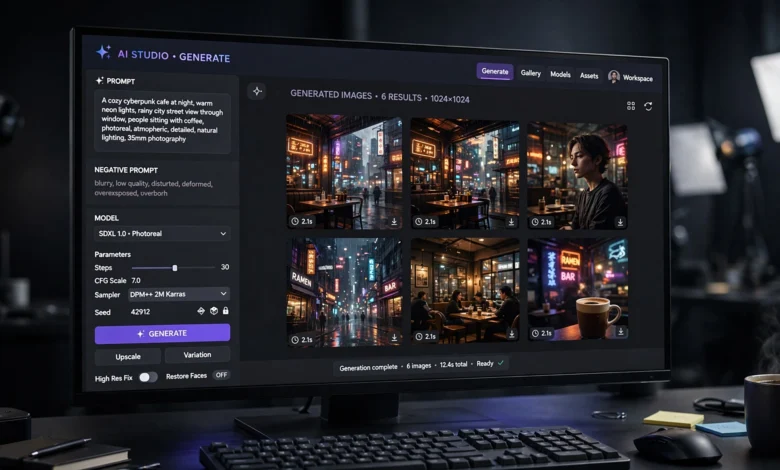
If you’ve opened social media in the past year, you’ve seen the proof: AI image generators have gone from a novelty to a genuine part of how people create. Marketers use them for ad creatives, designers use them for concept work, and regular people use them just to see a weird idea come to life. But here’s the problem nobody tells you upfront — not all AI image generators are built the same, and picking the wrong one can waste your time, your budget, or worse, land you in a copyright mess you didn’t see coming.
This guide cuts through the noise. Instead of listing every tool that showed up in a Google search, we’re focusing on the AI image generators that actually hold up under real use in 2026 — the ones that render readable text inside images, handle complex prompts without falling apart, and give you outputs you can actually use commercially without a lawyer breathing down your neck.
We’ll walk through what changed in the AI image space this year, break down nine tools worth your time, and help you figure out which one fits your actual workflow instead of just chasing whatever’s trending this week. Whether you’re a small business owner making product mockups, a hobbyist experimenting with digital art, or a content creator who needs visuals fast, there’s a tool on this list built for you. Let’s get into it.
Why AI Image Generators Look So Different in 2026
The AI image generation space moved fast this year. A year or two ago, the conversation was basically Midjourney versus a handful of Stable Diffusion forks. That’s not the case anymore. New models from OpenAI, Google, and Black Forest Labs pushed AI image generation into territory that felt impossible not long ago — accurate text rendering inside images, native 4K output, and models that actually plan a composition before generating instead of just guessing.
A few shifts are worth understanding before you pick a tool:
- Text rendering finally works. For years, asking an AI image generator to put readable words on a poster or product label was a gamble. That’s largely solved now across the top tools.
- Reasoning before rendering. Some of the newest models plan out a layout, check their own work, and even reference real-world information before generating — instead of producing a single blind guess.
- Resolution jumped. Native 2K and 4K output is now common at the premium tier, so you’re not stuck upscaling a blurry base image anymore.
- Commercial safety became a real differentiator. With ongoing lawsuits over training data, tools trained on licensed content (rather than scraped images) have become genuinely more attractive for business use.
Keep these shifts in mind as you read through the list, because they explain a lot of why certain tools made the cut this year and others didn’t.
How We Picked These AI Image Generators
Before ranking anything, it helps to know what actually separates a good AI image generator from a mediocre one. We looked at five factors across every tool on this list:
- Prompt adherence — does the output actually match what you asked for, including specific details like counts, poses, and composition?
- Visual fidelity — how clean, sharp, and realistic (or stylistically consistent) is the final image?
- Text rendering — can it place accurate, readable text inside an image without garbled letters?
- Commercial usability — can you legally use the output for business purposes, and does the provider stand behind that?
- Value for the price — is the subscription or credit system reasonable for what you get?
With that framework in mind, here are the AI image generators genuinely worth trying this year.
Top AI Image Generators Worth Trying in 2026
1. GPT Image 2 (OpenAI)
GPT Image 2 is currently sitting at the top of most independent leaderboards, and the gap between it and the next-best model is unusually large. What makes it different from earlier AI image generators is that it doesn’t just take a prompt and guess. It plans the layout first, can optionally pull in real-world reference details, and reviews its own output before handing it back to you.
Best for: designers and marketers who need precise prompt control and accurate in-image text, like posters, packaging mockups, and infographics.
Strengths:
- Exceptional text rendering, even with long strings of text
- Strong logical reasoning around spatial layout (correct number of objects, accurate poses)
- Tight integration with ChatGPT for iterative editing
Watch out for: it’s a paid, cloud-based tool with per-image or subscription costs, and there’s no local/offline version.
You can read more about OpenAI’s tools directly on OpenAI’s official site.
2. Nano Banana Pro (Google Gemini)
Google’s image model, nicknamed Nano Banana Pro, has quickly become one of the most talked-about AI image generators among creative professionals. It’s particularly strong at understanding what it’s actually generating, which means it can reconstruct new angles, alternate compositions, and different styles of the same subject with impressive consistency — something a lot of competing tools still struggle with.
Best for: professionals who need character consistency across multiple images, like campaign visuals or storyboards.
Strengths:
- Native 4K output at the top tier
- Strong “character locking” for reusing the same subject across prompts
- Real-time search integration for more accurate, current visual references
Watch out for: the free tier is limited, and heavier professional use requires a paid plan.
3. Midjourney V8.1
Midjourney remains one of the most recognizable names in AI image generation, and for good reason. It’s still arguably the best tool purely for artistic quality and stylistic range. If you want painterly, cinematic, or highly stylized output, Midjourney tends to edge out more literal, photorealistic competitors.
Best for: artists, illustrators, and creatives who prioritize aesthetic quality over strict prompt literalism.
Strengths:
- Renders at 2048×2048 by default now, a big jump from earlier versions
- Deep, mature style customization through parameters
- A massive, active community for prompt inspiration
Watch out for: it runs through Discord or a web app rather than a traditional interface, which some newcomers find clunky at first. It’s also not the go-to choice when strict commercial safety matters most, since its training data has faced legal scrutiny.
4. Adobe Firefly
If commercial safety is your top priority, Adobe Firefly is probably the most important entry on this list. Unlike many AI image generators trained on images scraped from across the web, Firefly is trained specifically on licensed Adobe Stock content, openly licensed material, and public domain images. That distinction matters more than it sounds — it’s the difference between generating an image you can confidently put in a client-facing ad campaign versus one that might carry legal risk.
Best for: businesses, agencies, and anyone who needs images cleared for commercial use without legal ambiguity.
Strengths:
- Trained on licensed content, which significantly reduces copyright risk
- IP indemnification for paying subscribers, giving businesses real legal backing
- Deep integration into Photoshop, Illustrator, and Adobe Express, so you never have to leave your existing workflow
- Every image includes embedded Content Credentials (C2PA metadata) showing it was AI-generated
Watch out for: the free plan adds a watermark you can’t remove, and pure artistic quality can sometimes lag slightly behind Midjourney for highly stylized work.
You can explore Firefly’s full feature set directly on Adobe’s official Firefly page.
5. FLUX.2 (Black Forest Labs)
FLUX.2 leads the open-source side of the AI image generator market right now. Built by Black Forest Labs, it’s become the go-to option for developers and technically inclined users who want strong output quality without being locked into a single company’s cloud platform.
Best for: developers, technical users, and anyone who wants flexibility to fine-tune or self-host.
Strengths:
- Generates up to four megapixels of detail
- Open architecture that supports custom fine-tuning
- Strong performance-to-cost ratio when run through an API
Watch out for: running it locally requires a capable GPU (at least 8GB VRAM is recommended), so it’s not as beginner-friendly as a purely cloud-based option.
6. Stable Diffusion 3.5
Stable Diffusion helped define the open-source corner of AI image generation years ago, and version 3.5 is still a legitimate contender. It’s not chasing the absolute top of the leaderboard the way GPT Image 2 or Nano Banana Pro are, but its flexibility and community-built ecosystem of custom models and plugins remain unmatched.
Best for: hobbyists, researchers, and anyone who wants full control over the model and generation process.
Strengths:
- Completely customizable with community-trained checkpoints and LoRAs
- Can run entirely offline once set up
- No subscription required if you’re running it locally
Watch out for: the learning curve is steeper than cloud-based tools, and local generation quality depends heavily on your hardware.
7. Ideogram
Ideogram carved out a specific niche among AI image generators: typography. If your project depends on getting text exactly right inside an image — think logos, posters, memes, or social graphics — Ideogram has consistently been one of the most reliable options, even before the bigger platforms caught up on text rendering.
Best for: designers who regularly need clean, accurate text layered into visuals.
Strengths:
- Strong, consistent text accuracy across fonts and styles
- Clean, modern interface that’s easy to pick up
- Generous free tier for casual users
Watch out for: it’s not as strong on photorealistic output compared to some of the bigger cloud models.
8. Leonardo AI
Leonardo AI positioned itself as a practical, all-in-one option among AI image generators, particularly for people working in game design, product concepting, and marketing. It offers a library of fine-tuned models built for specific styles, so you’re not stuck fighting a generic model to get the look you want.
Best for: game designers, product teams, and marketers who want style-specific models without training their own.
Strengths:
- Large library of pre-trained style models (icons, concept art, product photography)
- Built-in canvas editing for refining generated images
- Reasonable pricing tiers for small teams
Watch out for: the sheer number of model options can feel overwhelming to a first-time user.
9. Canva AI (Magic Media)
Canva’s built-in AI image generator, Magic Media, isn’t trying to compete on raw model quality with the likes of GPT Image 2 or Midjourney. Instead, it wins on convenience — it’s already inside a tool millions of people use for design work, so you can generate an image and drop it straight into a social post, presentation, or flyer without switching platforms.
Best for: small business owners, social media managers, and anyone who wants speed over cutting-edge quality.
Strengths:
- Zero learning curve if you already use Canva
- Generated images plug directly into templates and design projects
- Included in existing Canva Pro subscriptions, so no extra cost for many users
Watch out for: output quality and prompt precision generally trail the dedicated, top-tier models on this list.
How to Choose the Right AI Image Generator for You
With nine solid options, picking one comes down to matching the tool to your actual use case rather than chasing whichever name is trending. Here’s a quick way to think about it:
- If you need commercial safety above everything else → Adobe Firefly is the clearest choice, thanks to licensed training data and IP indemnification.
- If you want the sharpest, most literal prompt accuracy → GPT Image 2 currently leads on that front.
- If artistic style and creative variety matter most → Midjourney still has an edge for painterly, cinematic output.
- If you need accurate text inside your images constantly → Ideogram or GPT Image 2 will save you the most frustration.
- If you want full control and don’t mind a technical setup → FLUX.2 or Stable Diffusion 3.5 give you that flexibility.
- If you’re already inside a design workflow and just want speed → Canva AI or Leonardo AI will feel the most natural.
There’s no single “best” answer here. The right AI image generator is the one that fits how you actually work, not the one with the highest score on a leaderboard you’ll never personally test against.
Pricing Comparison at a Glance
Pricing across AI image generators varies quite a bit depending on whether you’re paying per image, per subscription tier, or nothing at all if you’re running an open-source model locally.
- Free tier available: Canva AI (with Pro), Stable Diffusion (self-hosted), Ideogram (limited daily credits)
- Subscription-based: Midjourney, Adobe Firefly, Leonardo AI
- Pay-per-use / API pricing: GPT Image 2, FLUX.2, Nano Banana Pro
- Best value for solo creators: Ideogram or Canva AI
- Best value for businesses: Adobe Firefly, thanks to bundled indemnification and Creative Cloud integration
If your budget is tight, start with a free tier or trial before committing to a monthly plan. Most of these tools offer enough free credits to genuinely test whether the output style fits your needs.
Tips for Getting Better Results from Any AI Image Generator
Regardless of which tool you pick, a few habits consistently improve output quality across every AI image generator on this list:
- Be specific about composition, not just subject matter. Instead of “a cat in a garden,” try “a close-up shot of an orange tabby cat sitting among purple flowers, soft afternoon light, shallow depth of field.”
- Name a style or reference point. Mentioning a specific aesthetic, era, or medium (film photography, watercolor, 3D render) gives the model something concrete to anchor to.
- Lock in character details early. If you’re generating a series of images with the same subject, describe that subject in detail on your first prompt and reuse the same wording in later prompts.
- Iterate instead of starting over. Most tools let you refine an existing generation rather than beginning from scratch. Use that instead of endlessly rewriting your original prompt.
- Check the commercial license before you publish. Free tiers and beta features often come with usage restrictions, even on tools generally considered safe for business use.
Frequently Asked Questions
What is the best AI image generator overall in 2026?
There isn’t one universal answer, since it depends on your priorities. GPT Image 2 currently leads on raw prompt accuracy and text rendering, Midjourney still wins on artistic style, and Adobe Firefly leads on commercial safety.
Are AI image generators free to use?
Some are. Tools like Canva AI, Ideogram, and self-hosted Stable Diffusion offer free access, though usually with limits on daily generations or resolution. Most of the higher-end AI image generators require a paid subscription or per-image credits once you move past casual use.
Can I use AI-generated images commercially?
It depends entirely on the tool and the specific plan you’re on. Adobe Firefly offers IP indemnification for paying subscribers, which is one of the strongest commercial guarantees currently available. Other tools allow commercial use but without that same legal backing, so it’s worth reading the terms before using generated images in paid campaigns.
Do AI image generators still struggle with text and hands?
Text rendering has improved dramatically across the top-tier tools in 2026, particularly GPT Image 2 and Ideogram. Hands and complex anatomy have also gotten noticeably better, though it’s still worth reviewing outputs closely before using them in final work.
Which AI image generator is best for beginners?
Canva AI is the easiest starting point if you’ve never used one of these tools before, since it’s built into a design platform you may already know. Ideogram is also beginner-friendly thanks to its clean interface and generous free tier.
Conclusion
The AI image generators worth trying in 2026 aren’t just flashy novelty tools anymore — they’re genuinely capable creative instruments that professionals are folding into real workflows, from ad campaigns to product mockups to concept art. GPT Image 2 and Nano Banana Pro currently lead on raw capability and reasoning, Midjourney still holds its ground on artistic style, and Adobe Firefly remains the safest bet when commercial licensing is non-negotiable, while open-source options like FLUX.2 and Stable Diffusion 3.5 give technical users total control.
The right choice ultimately comes down to what you’re making and how much control, cost, or legal certainty matters to you, so use the breakdown above to match a tool to your actual project instead of just picking whatever’s trending this week.