How to Reduce IoT Device Vulnerabilities
IoT device vulnerabilities put homes and businesses at risk. Here's a practical, no-nonsense guide to closing the gaps before attackers do.
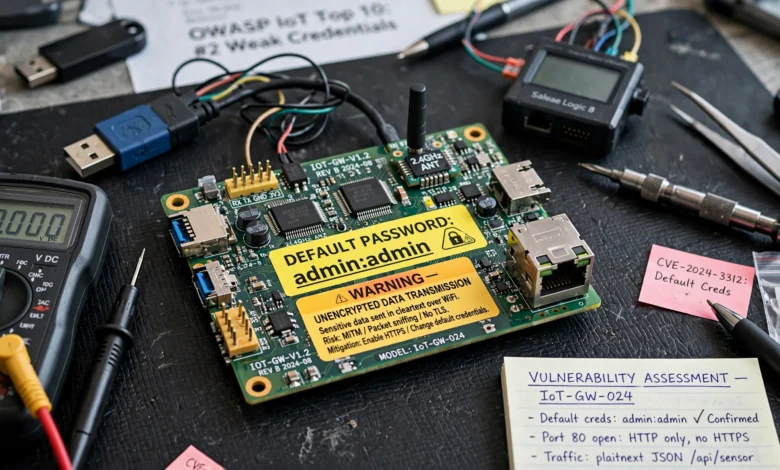
IoT device vulnerabilities are one of the quietest but most persistent problems in modern networks. Every smart camera, thermostat, sensor, and connected appliance you add to a network is another door that someone, somewhere, might try to open. Most of these devices weren’t built with security as the top priority. They were built to be cheap, fast to market, and easy to use, and security often got squeezed out of that equation.
That’s not a reason to panic, but it is a reason to pay attention. A single unpatched camera or a smart plug still running its factory password can become the entry point for an attacker to move across your entire network. This has already happened at scale, most famously with the Mirai botnet, which turned thousands of unsecured cameras and routers into a weapon used to knock major websites offline.
The good news is that reducing IoT vulnerabilities doesn’t require a security degree or a massive budget. It requires a handful of consistent habits: knowing what’s on your network, keeping it updated, limiting what each device can access, and watching for anything unusual. This guide walks through exactly how to do that, whether you’re managing a smart home, a small office, or a fleet of industrial sensors.
What Are IoT Device Vulnerabilities and Why They Matter
An IoT vulnerability is any weakness in a connected device’s hardware, software, firmware, or configuration that could let someone access, control, or disrupt it without permission. The term covers a wide range of issues, from a hardcoded password buried in the firmware to a data stream that isn’t encrypted as it travels across your network.
What makes IoT device security uniquely difficult is scale and diversity. A typical home might have a dozen connected devices. A hospital, factory floor, or smart building can have thousands, running dozens of different operating systems and communication protocols, many of which were never designed to receive a security patch after they left the factory. Unlike a laptop or phone, plenty of IoT devices have no built-in update mechanism at all, so a flaw discovered on day one can still be sitting there, unfixed, years later.
The consequences aren’t hypothetical. Compromised IoT devices have been used to:
- Launch large-scale distributed denial-of-service (DDoS) attacks
- Give attackers a foothold to move laterally into corporate networks
- Spy on households through hijacked cameras and microphones
- Disrupt industrial control systems and critical infrastructure
The Cybersecurity and Infrastructure Security Agency (CISA) has repeatedly flagged connected devices in critical infrastructure as a growing attack surface, which tells you this isn’t a niche concern anymore. It’s a mainstream one.
Common IoT Device Vulnerabilities You Should Know
Before you can fix a problem, it helps to know what you’re actually dealing with. Here are the vulnerabilities that show up again and again across security research and real-world breaches.
Weak or Default Passwords
This is still the number one issue. Many devices ship with a default username and password like “admin/admin,” and a large percentage of users never change it. Attackers know this and run automated scans looking for exactly these credentials.


Outdated or Unpatched Firmware
Firmware is the software baked into the device itself. When a manufacturer discovers a flaw, they may release a patch, but plenty of devices never get updated because users don’t know how, don’t bother, or the manufacturer has stopped supporting the product entirely.
Insecure Network Services
Some devices run network services, like Telnet or unencrypted web interfaces, that were never designed to be exposed to the open internet. If a device automatically opens ports through UPnP (Universal Plug and Play), it can end up reachable from anywhere without the owner realizing it.
Lack of Encryption
Data traveling between a device and the cloud, or between two devices on the same network, should be encrypted. When it isn’t, anyone intercepting that traffic can read or manipulate it. This is a common issue in cheaper devices, where cutting corners on cryptography keeps manufacturing costs down.
Insecure Physical Interfaces
Debugging ports, USB interfaces, or exposed circuit boards can let an attacker with physical access extract firmware, pull credentials, or reflash the device with malicious code.
Poor Device and Fleet Management
Organizations often lose track of exactly how many IoT devices they have, where they are, and what software version they’re running. You can’t secure what you can’t see, and this blind spot is one of the biggest IoT security risks in enterprise environments.
Weak or Unauthenticated APIs
Many IoT products communicate through APIs that connect the device to a mobile app or cloud service. If those APIs lack proper authentication or rate-limiting, attackers can use them to pull data or issue commands to devices they shouldn’t have access to.
How to Reduce IoT Device Vulnerabilities: Practical Steps
Now for the part that matters most. Here’s how to actually reduce IoT device vulnerabilities, in an order that reflects impact versus effort.
1. Change Default Credentials and Enforce Strong Authentication
This is step one for a reason. As soon as you unbox a new device, change the default username and password before it ever connects to your network. Use a unique, complex password for each device rather than reusing one across your entire smart home or office. Where the device supports it, enable two-factor authentication for any account tied to it.
If you’re managing many devices, a password manager or an enterprise credential vault makes this far less painful and keeps you from falling back on shortcuts.
2. Keep Firmware and Software Updated
Set a recurring reminder to check for firmware updates, or better yet, enable automatic updates if the manufacturer offers them. Before buying a new device, check whether the vendor has a track record of releasing security patches and how long they commit to supporting the product. A device that stops receiving updates after a year is a liability waiting to happen.
For organizations managing larger fleets, this means building a patch management process rather than relying on individual employees to remember. The National Institute of Standards and Technology (NIST) IoT cybersecurity guidance outlines baseline update and configuration practices that are worth reviewing if you’re setting this up formally.
3. Segment Your Network
Don’t let your smart doorbell sit on the same network as your work laptop or your point-of-sale system. Network segmentation means putting IoT devices on their own separate network or VLAN, so that if one device is compromised, the attacker can’t easily jump to more sensitive systems.
At home, this is as simple as using your router’s guest network feature for smart devices. In a business setting, it means:
- Creating dedicated VLANs for IoT traffic
- Restricting IoT devices from reaching core business systems by default
- Using firewalls to control exactly what each segment can communicate with
4. Encrypt Data in Transit and at Rest
Make sure any device you deploy supports TLS or another modern encryption standard for data leaving the device, and that sensitive data stored on the device itself is also encrypted. If a product’s documentation doesn’t mention encryption at all, treat that as a warning sign rather than an oversight.
5. Apply the Principle of Least Privilege
Every device, user account, and integration should have access to only what it strictly needs to function, nothing more. A temperature sensor doesn’t need write access to your building management system’s core controls. A guest’s smart speaker doesn’t need access to your home network’s file shares.
This principle also applies to people. Limit who on your team can configure or reset IoT devices, and keep an audit trail of who made changes and when.
6. Disable Unused Features and Ports
Most IoT devices ship with extra features turned on by default, remote access, Bluetooth, UPnP, unused network ports, that most users never touch. Every one of these is a potential entry point. Go through the settings menu and turn off anything you’re not actively using. This single step, often skipped, closes a surprising number of avenues an attacker could exploit.
7. Monitor Devices Continuously
Visibility is everything. You want to know, in near real time, if a device starts behaving strangely, communicating with an unfamiliar server, or generating unusual traffic volume. This can be as basic as reviewing your router’s connected devices list occasionally, or as sophisticated as deploying an IoT-specific monitoring platform that flags anomalies automatically.
Key things to watch for:
- New or unrecognized devices joining the network
- Sudden spikes in outbound traffic
- Devices contacting IP addresses or domains they’ve never used before
- Repeated failed login attempts
8. Choose Vendors with a Security Track Record
Not all manufacturers treat security the same way. Before buying, look for vendors that publish a vulnerability disclosure policy, respond quickly when researchers report flaws, and have a documented history of shipping updates. Checking a product or vendor name against the CVE database can give you a quick sense of how many known vulnerabilities exist and whether they were addressed.
9. Maintain a Complete Device Inventory
You can’t protect devices you don’t know about. Keep an up-to-date inventory that includes every connected device, its firmware version, its network location, and who’s responsible for it. For larger organizations, this inventory should feed directly into your patch management and monitoring processes, so nothing quietly falls out of scope.
IoT Security Best Practices for Businesses vs. Home Users
The core principles behind IoT vulnerability management are the same everywhere, but the scale and tools differ quite a bit.
For home users, the priorities are simple and manageable:
- Change default passwords on every device
- Put smart devices on a separate guest network
- Turn on automatic updates wherever available
- Buy from brands with a reasonable security reputation
- Disable remote access features you don’t actually use
For businesses, the same ideas apply, but at a scale that requires more structure:
- Formal asset inventory and lifecycle management for every connected device
- Network segmentation enforced through VLANs and firewalls, not just guest Wi-Fi
- Role-based access control tied to job function
- Continuous monitoring with automated alerting
- Vendor risk assessments before procurement
- A documented incident response plan specifically covering IoT compromise scenarios
Businesses operating in regulated industries also need to account for compliance obligations. Depending on the sector, unpatched or poorly configured IoT devices can trigger violations under data protection regulations, which adds a legal dimension on top of the technical one.
Building a Long-Term IoT Security Strategy
Fixing today’s vulnerabilities is only half the job. IoT devices tend to stick around for years, so reducing IoT security risks needs to be an ongoing process rather than a one-time cleanup.
A few habits worth building into your routine:
- Review your device inventory quarterly. New devices get added, old ones get forgotten. A regular review keeps your picture of the network accurate.
- Set a firmware update cadence. Don’t wait for a breach to remind you. Schedule checks monthly for critical devices and quarterly for lower-risk ones.
- Retire end-of-life devices promptly. If a manufacturer has stopped issuing security updates for a product, it’s time to replace it, even if it still technically works.
- Train the people using these devices. Whether it’s employees or family members, a short explanation of why default passwords and unnecessary remote access are risky goes a long way.
- Revisit your segmentation as you grow. A network layout that worked for ten devices might not hold up at a hundred. Reassess as your device count grows.
None of this requires exotic tools. It requires consistency, and treating IoT devices with the same seriousness you’d apply to any other computer on your network.
Conclusion
IoT device vulnerabilities aren’t going away, and the number of connected devices in homes and businesses keeps climbing every year, which means the attack surface keeps growing right along with it. The encouraging part is that most of the damage done through compromised IoT devices traces back to a small set of avoidable mistakes: default passwords left unchanged, firmware left unpatched, and devices left unsegmented and unmonitored on the same network as everything else.
By changing credentials immediately, keeping firmware current, segmenting your network, encrypting data, limiting access, and keeping a real inventory of what’s connected, you close off the paths attackers rely on most. Whether you’re securing a single smart home or a fleet of thousands of industrial sensors, these same fundamentals, applied consistently, are what actually keep connected devices safe over the long run.