What Is a VPN and Do You Really Need One?
Wondering what is a VPN and if you truly need one in 2026? Discover how a VPN works, its real benefits, and when it's worth it.
VPN stands for Virtual Private Network, and if you’ve spent any time online in the last few years, you’ve almost certainly seen the term pop up in ads, app store banners, or a coworker’s browser tab. But what is a VPN, actually, and does the average person really need one? This article cuts through the marketing noise to give you a clear, practical answer.
A VPN is a service that encrypts your internet traffic and routes it through a remote server, hiding your real IP address and making it much harder for outsiders to see what you’re doing online. That’s the technical definition. The more useful question is whether that protection actually matters for your daily life — whether you’re browsing from a coffee shop, working remotely, streaming shows while traveling, or just trying to keep your internet provider from selling your browsing habits to advertisers.
The truth, as one recent guide put it, sits somewhere between “magic privacy shield” and “total scam.” A VPN is a genuinely useful tool with specific, well-defined strengths — and equally specific limitations that no provider’s marketing page will highlight. In this guide, you’ll learn exactly how a VPN works, the real benefits it offers, the situations where it makes a meaningful difference, and — just as important — the situations where it won’t help at all. By the end, you’ll be able to decide for yourself whether a VPN belongs in your digital toolkit.
What Is a VPN? A Plain-English Definition
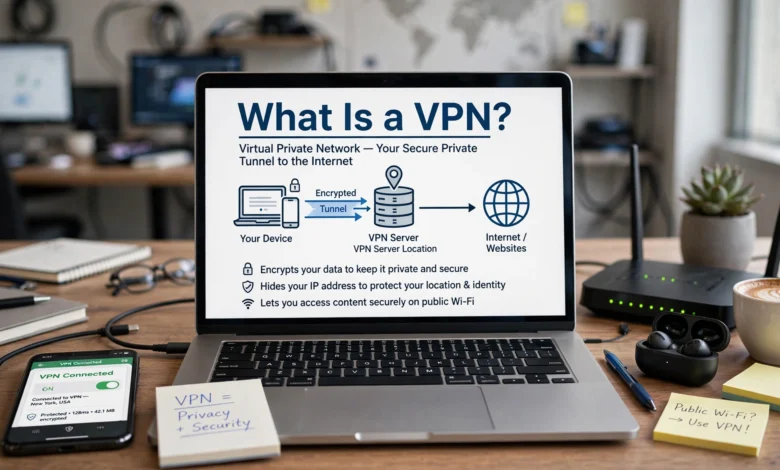
A Virtual Private Network (VPN) is software that creates an encrypted “tunnel” between your device and a server operated by the VPN provider. Instead of your laptop, phone, or tablet connecting directly to a website, your traffic first travels through this encrypted tunnel to the VPN server, which then forwards the request to the internet on your behalf.
Two things happen as a result:
- Your IP address is hidden. Websites and services see the VPN server’s IP address instead of your own, which masks your approximate location and makes it harder to link your activity back to you personally.
- Your traffic is encrypted. Data traveling between your device and the VPN server is scrambled using strong encryption, so anyone intercepting it — a hacker on public Wi-Fi, your internet service provider, or someone monitoring the network — sees unreadable code instead of your actual activity.
According to Fortinet’s cybersecurity glossary, a VPN works by routing a device’s internet connection through a private service rather than the user’s regular internet service provider, effectively hiding the user’s IP address and personal information from anyone monitoring the connection. This is the foundational mechanism behind every consumer and business VPN on the market today.
A Brief History of the VPN
VPN technology isn’t new. It was originally built for businesses, not individuals. The first VPN was developed in the mid-1990s to let remote employees securely access a company’s internal network from outside the office. It took nearly a decade for consumer-focused VPN services to emerge, aimed at everyday internet users who wanted to mask their IP address and protect their data from surveillance. Today, the same underlying technology protects both multinational corporations and someone streaming a show from a hotel Wi-Fi network.
How Does a VPN Work? The Technical Side, Simplified
To really understand what a VPN does, it helps to walk through what happens the moment you hit “Connect.”
- You launch the VPN app and select a server location (for example, a server in the UK or Germany).
- Your device and the VPN server perform a “handshake.” During this step, they agree on encryption keys that only the two of them know, establishing a secure connection before any real data is sent.
- All your internet traffic is encrypted and routed through this tunnel to the VPN server.
- The VPN server forwards your request to the website or app you’re trying to reach, using its own IP address instead of yours.
- The response travels back through the same encrypted tunnel to your device.
To the outside world — your ISP, the local Wi-Fi network, or anyone snooping on the connection — all they see is scrambled, encrypted data flowing to a VPN server. They cannot see which websites you’re visiting or what you’re sending.


VPN Protocols You Should Know
Every VPN relies on a protocol — the underlying set of rules that builds and secures the tunnel. The protocol you use affects your speed, security, and how easily your connection can be blocked or detected.
- WireGuard — The modern speed leader. It’s lightweight, fast, and increasingly the default protocol among major VPN providers.
- OpenVPN — A battle-tested, highly reliable option that’s excellent at getting through restrictive firewalls, though it can be more resource-intensive than newer alternatives.
- IKEv2/IPSec — Especially strong on mobile devices, since it handles the switch between Wi-Fi and cellular data smoothly without dropping the connection.
Most reputable VPN apps let you switch between protocols in the settings menu, so you can prioritize speed or reliability depending on what you’re doing.
Encryption: The Core of VPN Security
VPN encryption is what actually protects your data. Most trustworthy providers use AES-256 encryption — the same standard used by banks and governments — to scramble your traffic so it’s effectively unreadable to anyone without the decryption key. Some providers have also begun rolling out post-quantum encryption, designed to protect today’s encrypted data against future quantum computers that could theoretically break current encryption methods years from now. This matters most for people whose data has a long “shelf life” — journalists, activists, or professionals handling sensitive long-term information.
Why Do People Use a VPN? Key Benefits Explained
Understanding the mechanics is one thing; understanding why it matters in daily life is another. Here are the most common, practical reasons people rely on a VPN.
1. Protecting Your Data on Public Wi-Fi
Public Wi-Fi networks in airports, cafes, and hotels are notoriously insecure. Without protection, anyone else on that same network can potentially intercept unencrypted traffic — a technique known as a “man-in-the-middle attack.” A VPN encrypts your connection so that even on an unsecured network, your passwords, messages, and browsing activity stay private. This is widely considered one of the single most valuable VPN benefits for everyday users.
2. Preventing ISP Tracking and Throttling
Your internet service provider can see every site you visit unless your traffic is encrypted through a VPN or HTTPS. Some ISPs use this data for targeted advertising or even slow down (“throttle”) specific types of traffic, like streaming or gaming, during high-usage periods. A VPN hides your activity from your ISP, which can also help reduce activity-based throttling in some cases, since your provider can no longer see exactly what you’re doing.
3. Hiding Your IP Address and Location
Your IP address works like a return address on a letter — it can reveal your approximate location and, combined with other data, help build a profile of your online behavior. A VPN replaces your real IP address with the VPN server’s address, making it significantly harder for websites, advertisers, and data brokers to track you across the web.
4. Accessing Geo-Restricted Content
Streaming platforms like Netflix, Hulu, and Amazon Prime Video offer different content libraries depending on your country. By connecting to a VPN server in a different location, you can often access content libraries or services that aren’t normally available in your region — useful for travelers who want to keep using services they already pay for back home.
5. Securing Remote Work
With remote and hybrid work now a permanent fixture for many companies, VPNs play a critical role in enterprise security. A business VPN lets employees securely connect to internal company networks and resources from anywhere, protecting sensitive corporate data even when workers are using home or public networks.
6. Avoiding Targeted Ads and Data Profiling
Because a VPN masks your IP address and encrypts your browsing, it becomes harder for advertisers to build a detailed profile linking your searches, purchases, and interests back to your real identity.
7. Bypassing Government Censorship
In countries with heavy internet censorship, VPNs allow users to access blocked websites, independent news sources, and communication tools that would otherwise be unreachable. This is one of the most consequential uses of VPN technology worldwide, though it also carries legal risk in certain jurisdictions (more on that below).
What a VPN Does NOT Protect You From
This is the part most VPN marketing pages conveniently skip — and it’s essential to understand before you decide whether you need one.
- A VPN is not antivirus software. It won’t stop malware, viruses, or ransomware from infecting your device.
- A VPN won’t stop phishing scams. If you click a malicious link or hand over your password on a fake login page, a VPN can’t save you.
- A VPN doesn’t make you anonymous. If you log into Facebook, Gmail, or Amazon while connected to a VPN, those services still know exactly who you are — the VPN only hides your IP address, not your account activity.
- A VPN doesn’t guarantee streaming access. Many platforms actively detect and block VPN traffic, so geo-restriction bypassing isn’t always reliable.
- Free VPNs can create new risks. Some free providers log and sell user data to cover their costs — the very thing you were trying to avoid in the first place.
Understanding these limits is just as important as understanding the benefits. A VPN is one layer of protection, not a complete cybersecurity solution.
Do You Really Need a VPN? How to Decide
So — do you need a VPN? The honest answer is: it depends on your habits and risk level. Here’s a practical breakdown.
You probably need a VPN if you:
- Frequently connect to public Wi-Fi at coffee shops, airports, or hotels
- Work remotely and handle sensitive company or client data
- Travel internationally and want reliable access to your usual banking, email, or streaming accounts
- Live in or travel to a country with heavy internet censorship
- Want to reduce ISP tracking and targeted advertising
- Are a journalist, activist, or professional who needs stronger privacy protections
A VPN may matter less if you:
- Almost exclusively use a trusted, secured home network
- Already rely heavily on HTTPS-secured sites (which encrypt data in transit on their own) and strong account security like two-factor authentication
- Don’t handle particularly sensitive data online
- Are looking for guaranteed access to geo-blocked streaming content, since results can vary by platform
Even in the “less critical” scenarios, most cybersecurity experts still recommend a VPN as a reasonable, low-effort layer of protection — much like wearing a seatbelt even on a short drive.
How to Choose a Good VPN
Not all VPN services are created equal. If you decide a VPN is right for you, here’s what to look for:
- A verified no-logs policy — ideally confirmed by independent third-party audits, not just a claim on the website.
- Strong encryption — look for AES-256 encryption at minimum, with post-quantum protection as a growing bonus feature.
- A kill switch — this automatically cuts your internet connection if the VPN drops, preventing accidental data leaks.
- DNS leak protection — ensures your DNS requests aren’t secretly bypassing the encrypted tunnel.
- A privacy-friendly jurisdiction — some countries have stricter data-sharing laws than others, which affects what a provider can be legally compelled to disclose.
- Reasonable server coverage and speed — more server locations generally mean better performance and more options for accessing region-specific content.
- Transparent pricing — be cautious of “free forever” VPNs, since running server infrastructure costs money, and that cost has to come from somewhere.
For deeper guidance on evaluating digital privacy tools generally, the Electronic Frontier Foundation’s Surveillance Self-Defense guide is a widely respected, independent resource that explains privacy fundamentals beyond VPNs alone, including secure browsing habits and threat modeling.
Is Using a VPN Legal?
In most Western countries, using a VPN is completely legal, and millions of people use one daily for work, streaming, and everyday browsing. However, a handful of countries with authoritarian internet policies restrict or ban independent VPN use entirely, and using one there can carry legal consequences. If you’re traveling, it’s worth checking the local laws of your destination country before relying on a VPN to bypass restrictions.
VPN vs. Other Privacy Tools: A Quick Comparison
It’s easy to confuse a VPN with other privacy and security tools. Here’s a quick breakdown of how they differ:
- VPN vs. Proxy: A proxy also hides your IP address, but typically doesn’t encrypt your traffic the way a VPN does, making it less secure overall.
- VPN vs. Antivirus: Antivirus software detects and removes malware on your device; a VPN protects your data in transit. They serve different purposes and work best together.
- VPN vs. Tor: Tor routes traffic through multiple volunteer-run nodes for stronger anonymity but is typically much slower than a standard VPN connection.
- VPN vs. HTTPS: HTTPS encrypts the connection between your browser and a specific website; a VPN encrypts all your device’s internet traffic, regardless of the site or app.
Common VPN Myths, Debunked
- “A VPN makes me 100% anonymous online.” False. It hides your IP address, but logged-in accounts, cookies, and browser fingerprinting can still identify you.
- “Free VPNs are just as good as paid ones.” Rarely true. Free services often have data caps, slower speeds, and, in some cases, questionable data practices.
- “VPNs are only for tech experts or people with something to hide.” Not accurate. Millions of everyday users rely on a VPN simply to protect ordinary activities like online banking, shopping, and browsing on public Wi-Fi.
- “A VPN will always slow down my internet.” Modern protocols like WireGuard have significantly reduced this impact, though some speed reduction is still normal due to the extra encryption step.
Frequently Asked Questions
Does a VPN hide everything I do online? No. A VPN hides your IP address and encrypts your traffic, but it doesn’t hide activity tied to accounts you’re logged into, nor does it stop tracking methods like browser fingerprinting or cookies.
Can a VPN protect me from hackers? A VPN significantly reduces certain risks, particularly on public Wi-Fi, by encrypting your data and making it much harder to intercept. It’s not a full replacement for antivirus software or safe browsing habits, though.
Will a VPN slow down my internet connection? Most VPNs cause a small, often barely noticeable dip in speed due to the encryption process and the extra routing step. Modern protocols have minimized this significantly.
Are VPNs worth it for everyday users, not just businesses? Yes. While VPNs originated as a business tool, everyday benefits — public Wi-Fi protection, reduced ISP tracking, and safer browsing while traveling — make them useful for the average person too.
Should I use a free VPN? Generally, it’s best to avoid free VPNs for anything involving sensitive information. Running servers costs money, and services with no subscription fee often monetize user data instead.
Conclusion
A VPN is a genuinely useful privacy and security tool that encrypts your internet traffic and hides your IP address by routing your connection through a remote server — but it isn’t a magic cure-all for every online risk. It excels at protecting you on public Wi-Fi, reducing ISP tracking and throttling, supporting secure remote work, and helping you access region-specific content, while leaving gaps around malware protection, phishing, and true anonymity that require other tools to address.
Whether you truly need one comes down to your habits: frequent travelers, remote workers, public Wi-Fi users, and privacy-conscious individuals will likely find real, everyday value in a reliable VPN, while those who rarely leave a secured home network may find the benefit smaller but still worthwhile as an added layer of protection. As with most cybersecurity decisions, the right choice isn’t about hype — it’s about understanding exactly what a VPN can and can’t do, and matching that to how you actually use the internet.