Best Mechanical Keyboards for Every Budget
Find the best mechanical keyboards for every budget in 2026, from $50 starters to $300 endgame builds, tested for typing, gaming, and daily work.
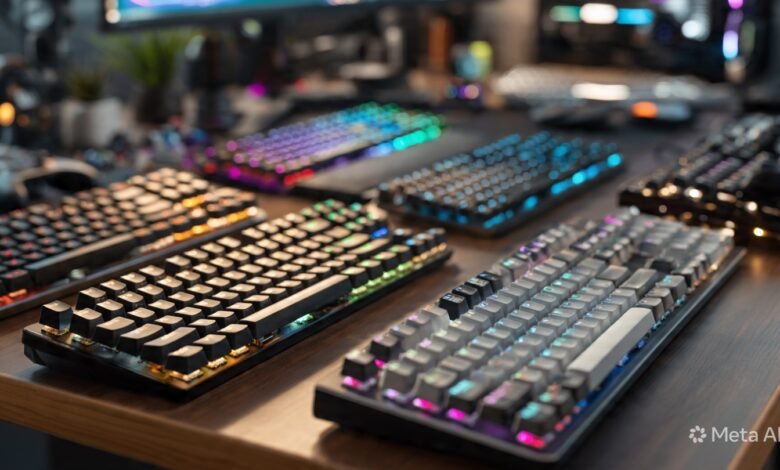
The market for the best mechanical keyboards has changed more in the last two years than in the entire decade before it. Boards that used to cost $200 are now sitting under $80, hot-swappable PCBs and gasket mounts are showing up on entry-level models, and Hall Effect switches that started in pro-gamer rigs are now an option you can pick at almost any price point. So if the last time you bought a mechanical keyboard was in 2020, basically everything you knew about value is out of date.
That is good news for you. It also makes shopping harder, because the labels on the box rarely tell you whether a $90 keyboard actually punches above its price or just looks like it does. This guide walks through the best mechanical keyboards for every budget, broken out by what you can spend, what you actually do at your desk, and what trade-offs you should expect at each tier. Whether you want a quiet board for the office, a tournament-ready setup for ranked play, or a custom-feeling typing experience without spending custom money, there is a pick here that fits.
Every recommendation reflects what reviewers and the wider mechanical keyboard community have consistently called out as solid in 2026. Prices listed are typical street prices and they shift, so always check before buying.
What Makes a Mechanical Keyboard Worth Buying
Before jumping into the picks, it helps to understand what you are paying for. A mechanical keyboard uses an individual physical switch under each key, instead of the rubber dome layer in cheap membrane keyboards. That single design choice is responsible for most of what people love about mechanical: durability measured in tens of millions of keystrokes, a clearer typing rhythm, and a feel you can actually tune to your taste.
Switch Types Explained
The switch is the single biggest factor in how a keyboard feels. Get this wrong and you will not enjoy the board no matter how nice the case is.
- Linear switches (Cherry MX Red, Gateron Yellow, most stock Keychron switches): smooth top to bottom with no bump. Quiet, fast, and a favorite among gamers.
- Tactile switches (Cherry MX Brown, Holy Pandas, Boba U4T): a noticeable bump partway through the press. Most typists who try these never go back.
- Clicky switches (Cherry MX Blue, Kailh Box White, Razer Green): tactile bump plus an audible click. Satisfying, but your coworkers will hear it from another room.
- Hall Effect and magnetic switches (Wooting Lekker, Gateron Magnetic Jade): use magnets instead of metal contacts, allow adjustable actuation, and enable rapid trigger for competitive games.
- Topre and electrocapacitive (HHKB, Realforce): a rubber dome over a spring, weirdly enough, but with a feel that has its own loyal following.
If you are unsure where to start, tactile switches are the safest bet for a first mechanical keyboard. They handle typing, coding, and casual gaming without committing you to one camp.
Layout Sizes and What They Mean
Layout is the other choice that affects daily use as much as the switch.
- Full-size (100%): every key including the number pad. Best for spreadsheets and accounting.
- Tenkeyless / TKL (80%): drops the number pad. Leaves room for your mouse.
- 75%: TKL feel in a tighter package, function row intact.
- 65%: drops the function row, keeps arrow keys.
- 60%: minimum keys, maximum desk space. Great for travel or a clean desk.
- 96% / 1800: full-size keys squeezed together with no gaps. The compromise pick.
Hot-Swap, QMK, and Why They Matter
A hot-swappable keyboard lets you pull switches out by hand and install new ones without soldering. Five years ago this was a custom-build feature. In 2026 it is on $60 boards. QMK and VIA are open-source firmware that let you remap any key, build macros, and tweak layers in a graphical interface. If you plan to keep a keyboard for years, hot-swap and VIA support are the two features most worth chasing.
For a deeper breakdown of switch construction and feel, RTINGS’ mechanical keyboard testing methodology is one of the most thorough public resources online and worth bookmarking.

Best Mechanical Keyboards Under $50
The under-$50 tier used to be a graveyard. Today it is genuinely competitive. You will not get aluminum cases or fancy switches, but you can absolutely get a board that types well and lasts.
Royal Kludge RK84 Pro (around $49)
The RK84 Pro is the easy answer here. You get a 75% layout, hot-swappable switches, tri-mode connectivity (Bluetooth, 2.4GHz wireless, USB-C wired), and decent stock keycaps for less than the cost of a single Cherry MX switch tester kit. Build is mostly plastic, but the typing feel is shockingly close to boards three times the price. For a first mechanical or a backup for the office, this is a no-brainer pick.
Best for: First-time buyers and anyone who wants wireless without paying for it.
Redragon K552 Kumara (around $35)
A workhorse TKL with red backlighting and basic Outemu Blue or Red switches. The body is steel-plated, which makes it heavier and more solid than the plastic competition. You will not love the keycaps and there is no hot-swap, but for the price it is hard to argue with. A lot of people enter the hobby through this exact keyboard.
Best for: Tight budgets and gamers who want a reliable wired board without RGB chaos.
Akko 3068B Plus (around $59)
Slight stretch over the $50 mark in some regions, but worth flagging. PBT keycaps, hot-swap, and Akko’s own switches that punch well above their price. The build feels more refined than anything else in this bracket.
Best Mechanical Keyboards Between $50 and $100
This is the sweet spot. The best mechanical keyboards under $100 in 2026 give you 80 to 90 percent of what flagship boards offer for a fraction of the price.
Keychron V1 / V5 Max (around $94)
If we had to pick one keyboard that defines this tier, it would be a Keychron V-series. The V1 is a 75% layout, the V5 is full-size, and the Max versions add tri-mode wireless. Every one of them ships with hot-swap PCBs, double-shot PBT keycaps, gasket mount construction, and full QMK and VIA support. Out of the box they sound surprisingly thocky thanks to factory foam damping. For most people reading this guide, a Keychron V is the answer.
Best for: The all-rounder pick for typing, light gaming, and tinkering.
Logitech K845 (around $59)
Plain, no software, no RGB, just a steel-plate full-size mechanical keyboard with Cherry switch options. For a no-fuss productivity clacker (with occasional gaming on the side), it remains a strong value, especially on sale. If you work in an office and want something that does not look like a gaming setup, this is the call.
Best for: Office desks and people who hate companion software.
Epomaker TH80 Pro (around $89)
75% layout, hot-swap, gasket mount, RGB, and tri-mode wireless. Epomaker has been steadily improving their stock typing experience and the TH80 Pro is one of their stronger releases. Comes with their proprietary Flamingo or Wisteria switches that are surprisingly nice.
Best Mechanical Keyboards Between $100 and $200
This bracket is where flagship-quality features become standard. You should expect aluminum cases, PBT keycaps, hot-swap, gasket mount, and either premium wireless or competitive-grade wired latency.
Keychron Q1 (around $169)
The Keychron Q1 is the keyboard that arguably created the modern mid-range. CNC aluminum case, gasket mount, double-shot PBT, hot-swap, screw-in stabilizers, and full VIA support. It weighs nearly 1.7 kilograms, which sounds excessive until you type on it and realize that mass is exactly why nice keyboards feel nice. The Q1 sounds and feels like a custom build out of the box.
Best for: Typists upgrading from a budget board who want a forever keyboard.
Corsair K70 Pro TKL (around $139)
For gaming, this is the more interesting pick. Hall Effect switches, adjustable actuation, rapid trigger, and SOCD support. The polling rate goes up to 8,000 Hz on wired, which most players will not feel but is there if you want it. The all-metal frame is built like a brick.
Best for: Competitive gamers who want flagship features without going to Wooting prices.
Logitech MX Mechanical (around $149)
Quiet, low-profile, and aimed squarely at productivity rather than gaming. Multi-device pairing (Logitech Flow), backlight that adjusts to ambient light, and a battery that lasts months on a charge. If you live in spreadsheets and emails and want a mechanical that does not announce itself, this is the one.
Best for: Knowledge workers and Mac users.
Best Mechanical Keyboards Between $200 and $300
At this point, you are paying for either premium build or specialized capability. Almost every keyboard here would have been considered an enthusiast custom build in 2021.
Wooting 80HE (around $239)
The Wooting 80HE is the answer if you take competitive games seriously. Wooting pioneered analog Hall Effect keyboards, and the 80HE is their masterpiece. 0.1mm to 4.0mm adjustable actuation, rapid trigger with 0.1mm sensitivity, and Wootility, the best keyboard config tool in the business. Pros in Counter-Strike, Valorant, and other tac shooters have been switching in numbers, and there is a real, measurable advantage to rapid trigger on counter-strafing.
Best for: Ranked players who want every legal edge.
Asus ROG Strix Scope II 96 Wireless (around $249)
This is one of the few mainstream gaming keyboards that has genuinely brought enthusiast-style upgrades into a gaming product. It has plenty of keys (including a 10-key numberpad) but it won’t take up too much desk space, and it’s wireless with tri-mode connectivity and a whopping 1,500 hours of battery life. The typing feel and stabilizer tuning are dramatically better than older Asus boards.
Best for: Gamers who want a number pad without the desk space sacrifice.
Das Keyboard DeltaForce 65 (around $199)
Hot-swappable, gasket-mounted, PBT, and built like furniture. The 65% layout keeps arrow keys and most navigation keys while staying compact. Das has always made boards aimed at typists and the DeltaForce continues that tradition.
Best for: Writers and developers who want a small, premium typing tool.
Best Mechanical Keyboards Above $300 (Endgame Tier)
Above $300, you are in territory where buying decisions are about specific feel, layout philosophy, or hobby identity, not raw value. Most people do not need to spend this much. Some of us do anyway.
Happy Hacking Keyboard (HHKB) Studio (around $385)
The HHKB Studio keeps the legendary Topre electrocapacitive feel that made the line famous and now adds Bluetooth, a pointing stick, and gesture pads. The HHKB layout puts Control where Caps Lock is and keeps your hands on the home row. Programmers love it. The 45-gram Topre switches have a deep, soft thock that no MX-style switch quite replicates. It is also the most divisive keyboard on this list. Some buyers find the layout life-changing. Others bounce off it within a week.
Best for: Programmers, vim users, and anyone willing to relearn their muscle memory.
Keychron Q1 HE 8K (around $279 to $329)
Takes everything great about the original Q1, the gasket mount, the aluminum case, the hot-swap PCB, and adds Hall Effect magnetic switches. Adjustable actuation from 0.1 mm to 4.0 mm, rapid trigger for gaming, and that smooth linear feel magnetic switches are known for. If you want one keyboard for everything, this is a serious candidate.
Best for: People who want a custom-feel typing experience and a competitive gaming board in the same unit.
Mode Sonnet, Cannonkeys Bakeneko, or Group Buys
If you are over $300 and curious about the deeper end of the hobby, custom keyboard kits start to make sense. They are not for everyone. Lead times of three to nine months are normal, and you will be sourcing switches and keycaps separately. But the feel is simply on another level.
Best Mechanical Keyboards by Use Case
Sometimes budget is not the deciding factor. Use case is. Here are quick category winners drawn from the picks above.
Best for Gaming
- Under $100: Royal Kludge RK84 Pro
- Mid-range: Corsair K70 Pro TKL
- Premium: Wooting 80HE
For competitive play, prioritize Hall Effect switches, rapid trigger, and a polling rate of at least 1,000 Hz. Polling rates above that are mostly marketing for keyboards.
Best for Typing and Writing
- Under $100: Keychron V1 / V5 Max
- Mid-range: Keychron Q1
- Premium: HHKB Studio or Das Keyboard DeltaForce 65
For typing, look for gasket mount construction, PBT keycaps, decent stabilizers, and a tactile switch.
Best for Programming
- Keychron Q1 (full layout, programmable layers via VIA)
- HHKB Studio (Control on home row, pointing stick)
- Any 75% or 65% board with QMK support
Best for Office and Quiet Environments
- Logitech MX Mechanical (low-profile, soft tactile)
- Logitech K845 with Cherry MX Brown
- Any board fitted with silent linear switches like Gateron Silent Yellows
If you share a workspace, please do not buy clicky switches. Your team will thank you.
How to Pick Without Overthinking It
It is easy to spiral on this. There are thousands of switches, dozens of layouts, and an entire YouTube ecosystem dedicated to making you doubt your choice. Here is the short version.
- Set a hard budget. Mechanical keyboards have steep diminishing returns above $200.
- Pick a layout. TKL or 75% suit most people. Full-size if you live in spreadsheets. 60% if you want desk space.
- Pick a switch family. Tactile if unsure. Linear if you mostly game. Clicky only if you live alone.
- Decide on hot-swap. If you want flexibility later, get hot-swap. The price difference is small in 2026.
- Decide on wireless. Worth it if you carry the keyboard around. Otherwise wired is cheaper, lower-latency, and never needs charging.
- Read two reviews. Not ten. Not the whole r/MechanicalKeyboards megathread. Two. Then buy.
If you are stuck choosing between specific switches, the Keychron switch comparison guide is a good starting point with sound clips and force curves.
Maintenance and Longevity
A mechanical keyboard properly cared for can outlast the computer you bought it with. Cherry-rated switches are tested to 50 to 100 million keystrokes. Topre is rated to 30 million. Most enthusiast switches fall somewhere in between.
Things that genuinely matter:
- Pull keycaps off and clean every few months. Use a keycap puller, never a screwdriver. Wash keycaps in warm soapy water, air dry fully before reinstalling.
- Compressed air through the switches. Crumbs and dust are the main reason switches fail early.
- Avoid eating directly over the keyboard. Yes, this is obvious. Yes, you will do it anyway. At least keep drinks out of striking range.
- Re-lube your stabilizers if they start rattling. A small tube of dielectric grease is $5 and turns a budget board into something that sounds genuinely premium.
If a switch dies on a hot-swap board, replacing it costs less than a coffee. If it dies on a soldered board, you need a soldering iron and twenty minutes. Either way, your keyboard is fixable.
Frequently Asked Questions
Are mechanical keyboards worth it?
For anyone who types more than an hour a day, yes. The combination of typing comfort, durability, and customization adds up over years of use. The hard part is committing to the right switch the first time.
What is the best mechanical keyboard for beginners?
For most beginners, the Keychron V1 or V5 Max is the easiest answer. It includes hot-swap PCBs (so you can change switches later), good stock keycaps, and reasonable price. The Royal Kludge RK84 Pro is the budget version of the same recommendation.
Are wireless mechanical keyboards good for gaming?
In 2026, yes. Modern 2.4 GHz wireless on boards like the Wooting 80HE, Asus ROG Strix Scope II, and Keychron Q-series wireless models has latency indistinguishable from wired in normal gameplay. Bluetooth still adds noticeable lag and should not be used for competitive play.
What is the difference between cheap and expensive mechanical keyboards?
You are mostly paying for case material (aluminum versus plastic), keycap quality (PBT versus ABS), stabilizer tuning, switch quality, build precision, and software polish. The typing feel difference between a $60 board and a $250 board is real but not 4x. The difference between a $250 and a $500 board is mostly diminishing returns.
How long do mechanical keyboards last?
Properly cared for, ten years or more is normal. The switches will outlast the case. Most failures come from cable wear (use detachable USB-C boards), spilled drinks, or worn keycaps on cheaper ABS sets. Hot-swappable boards make worn switches a cheap fix.
Are Hall Effect switches better than mechanical?
For competitive gaming, the rapid trigger and adjustable actuation are real advantages. For typing, traditional tactile mechanical switches still feel better to most people. They are not strictly better, just different.
Final Thoughts
The best mechanical keyboards for every budget in 2026 share something that did not exist five years ago: there are no obvious bad choices at any price tier. A $50 board genuinely types well. A $150 board feels like a custom build. A $300 board is a finished object you will keep for a decade. Pick a layout you can live with, a switch that matches how you type or play, and a build quality that matches your budget.
Whether you land on the Royal Kludge RK84 Pro, the Keychron V5 Max, the Corsair K70 Pro TKL, the Wooting 80HE, or the HHKB Studio, you are getting a tool that will quietly improve every hour you spend at a computer for years to come. Spend a little time thinking about what you actually do at your desk, set a budget you are comfortable with, and trust that the modern mechanical keyboard market is finally generous enough to reward whatever choice you make.