Best Gaming PCs You Can Buy Right Now
The best gaming PCs of 2026 ranked for every budget — from 1080p entry-level rigs to monstrous 4K powerhouses. Find your perfect build today.
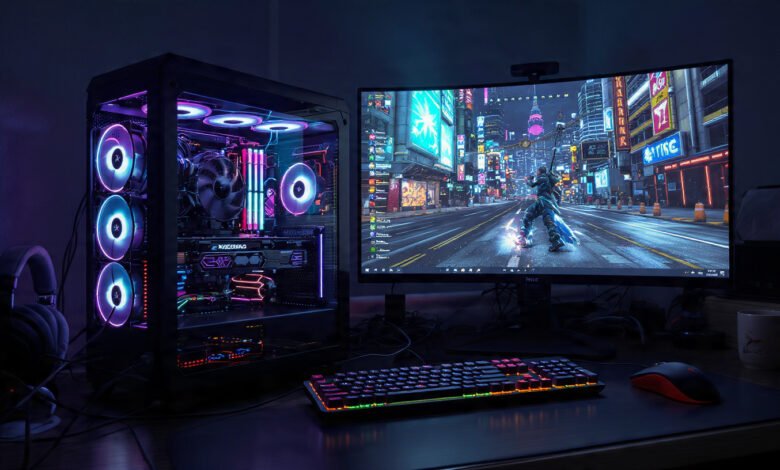
Best gaming PCs are better than they have ever been, and that is both exciting and a little overwhelming. Walk into the market right now and you are looking at a generation of machines powered by AMD’s Ryzen 9000 X3D chips, Nvidia’s RTX 50-series GPUs, and DDR5 memory that was science fiction just three years ago. The performance jump is real, and for anyone who has been holding off on an upgrade, 2026 is a genuinely great time to buy.
But there is a catch. Component prices have been climbing, partly due to a global memory shortage that is pushing RAM and SSD costs higher. At the same time, GPU tariff concerns have made some high-end cards harder to find at MSRP. Navigating all of this while trying to pick the right machine is enough to give anyone a headache.
That is exactly why this guide exists. Whether you are a first-time buyer looking for a solid 1080p rig under $1,000, a competitive player who needs buttery-smooth 1440p performance, or an enthusiast chasing 4K with ray tracing cranked up, there is a prebuilt gaming PC in this list for you. We have analyzed real-world benchmarks, thermal performance, upgrade paths, and long-term value to give you an honest picture of each system. No fluff, no filler — just the machines worth your money right now.
What Makes a Great Gaming PC in 2026?
Before diving into specific recommendations, it helps to understand what separates a good gaming desktop from a great one. The hardware landscape has shifted enough in the past year that some older buying advice no longer applies.
The GPU Is Still the Most Important Component
This has not changed. Your graphics card determines what resolution and frame rate you can realistically target. In 2026, the two major GPU families worth your attention are Nvidia’s RTX 50-series and AMD’s new RX 9000 series.
- Nvidia RTX 5060 Ti — Best for 1080p gaming with DLSS 4 support
- Nvidia RTX 5070 — The sweet spot for 1440p gaming
- Nvidia RTX 5070 Ti — Handles 1440p at high refresh rates and capable 4K
- Nvidia RTX 5080 and RTX 5090 — Extreme 4K performance, extreme prices
- AMD RX 9070 XT — Outstanding raster performance and 16GB VRAM at a competitive price
- AMD RX 9070 — Strong value for 1440p gaming without the premium markup
CPU: AMD Has the Gaming Crown Right Now
The AMD Ryzen 7 9800X3D is widely regarded as the top gaming CPU available, thanks to its unique 3D V-Cache architecture that dramatically reduces latency in gaming workloads. AMD also announced the Ryzen 7 9850X3D at CES 2026, which is beginning to appear in premium prebuilt configurations. Intel’s 13th and 14th Gen processors remain solid options, particularly for productivity-heavy workloads, but AMD currently leads in raw gaming performance.
RAM and Storage
There is currently a worldwide RAM shortage that is pushing memory prices up steeply, which affects not just RAM sticks but also SSDs and graphics cards — three components that are especially critical in a gaming PC. For a modern gaming build, you want a minimum of 32GB of DDR5 RAM. Anything less and you will start to feel pinched in newer open-world titles. For storage, a 1TB NVMe SSD is the floor; 2TB is more practical given how large modern games have become.
Cooling Matters More Than People Think
A fast chip that runs hot and throttles is worse than a slightly slower chip that stays cool under sustained load. When evaluating a prebuilt gaming desktop, pay attention to whether it uses a quality AIO liquid cooler or a well-engineered air cooler. Systems with cramped cases and poor airflow will underperform their specs on paper.
The 10 Best Gaming PCs You Can Buy Right Now
1. Corsair Vengeance a7500 — Best Overall Gaming PC
Price: Around $2,000 | GPU: RTX 5070 Ti | CPU: AMD Ryzen 7 9800X3D

Corsair’s Vengeance a7500 pairs an AMD Ryzen 7 9800X3D with a GeForce RTX 5070 Ti in a premium case built from Corsair’s own components, and the result is a system that genuinely feels like something you could have assembled yourself — in the best possible way. Testing shows strong performance at 1080p, with most games including demanding AAA titles also being playable at 4K.
What makes the a7500 stand out beyond raw performance is the build quality and support package. Corsair backs it with a two-year warranty, which is better coverage than most prebuilts on the market. The components are standardized, not proprietary, which means upgrades down the road are straightforward.
Why buy it:
- The Ryzen 9800X3D is the best gaming CPU money can buy right now
- Standardized parts mean easy upgrades later
- Two-year warranty is rare in the prebuilt space
- Clean aesthetics that do not scream “gamer rig” at maximum volume
Who should skip it: Budget shoppers. This machine is priced for people who want a premium experience and are willing to pay for it.
2. Corsair Vengeance i7600 — Best for Reliability and Build Quality
Price: Around $1,800–$2,200 | GPU: RTX 5070 Ti | CPU: Intel Core i9
The Corsair Vengeance i7600 earns recognition as a top overall pick thanks to its consistent premium experience across build quality, performance stability, and long-term reliability. Its use of high-quality Corsair components ensures excellent system compatibility, while efficient liquid cooling keeps noise levels low even under sustained load.
For buyers who prioritize peace of mind over squeezing out every last frame, this is the machine to get. It is not the cheapest way to get this level of performance, but the build quality is genuinely a step above most prebuilts at any price.
3. HP OMEN 45L — Best Mid-to-High Range Gaming Desktop
Price: Around $1,800–$2,200 | GPU: RTX 5070 Ti | CPU: Intel Core Ultra 7 265K
The HP OMEN 45L delivers a potent mix of performance, cooling, and design. Equipped with the Intel Core Ultra 7 265K and NVIDIA GeForce RTX 5070 Ti, it handles AAA titles and competitive esports games with ease even at ultra settings. One of its most compelling features is HP’s Cryo Chamber cooling system — a dedicated compartment that houses the liquid cooler, isolating it from internal heat and improving overall thermal efficiency.
This is a machine designed for marathon sessions. The cooling architecture is more thoughtful than most competitors, and the tempered glass chassis looks polished without being over the top. Tool-free upgrade access is a practical touch that you will appreciate the first time you want to swap in more storage.
Highlights:
- 32GB DDR5 RAM and 1TB NVMe SSD out of the box
- Cryo Chamber cooling system keeps thermals stable under heavy load
- Microsoft Copilot integration with Windows 11 Pro
- Strong choice for people who also use their PC for content creation or streaming
4. Alienware Aurora R16 — Best High-End Gaming PC for Enthusiasts
Price: Around $2,500–$3,500 | GPU: RTX 5080 or RTX 5090 | CPU: Intel Core Ultra 9 285K
The Alienware Aurora R16 remains a top choice for enthusiasts who want unmatched performance, expandability, and style. The Intel Core Ultra 9 285K CPU, with turbo boost up to 5.7GHz, delivers lightning-fast performance for gaming, streaming, and professional tasks, while liquid cooling maintains thermal stability during prolonged sessions.
Alienware builds are assembled in Texas, which matters if you are worried about potential tariff impacts on imported systems. The Aurora R16 is also notably quiet for a machine running this level of hardware — a genuine engineering feat that many competitors cannot match at this power output.
This is the machine for someone who wants to max out 4K gaming today and not think about upgrading for four or five years.
5. MSI Codex Z2 — Best Quiet Gaming PC
Price: Around $1,400–$1,700 | GPU: RTX 5070 | CPU: Intel Core i7 or AMD Ryzen 7
The MSI Codex Z2 is an especially appealing pick for anyone gaming in a home office, shared room, or anywhere noise matters. MSI’s air-cooling setup and quieter fan tuning helped keep the system calm under load, even during long sessions. The RTX 5070 handled modern visuals smoothly, including ray tracing, without significant FPS drops — and the chassis is lighter than most full-size towers, making it easy to move or reposition.
If you work from home and your gaming PC doubles as your daily driver, the Codex Z2 deserves serious consideration. The noise profile at full gaming load is genuinely impressive, and the performance at 1440p is excellent for the price.
6. CyberPowerPC Gamer Xtreme VR — Best Gaming PC Under $1,000
Price: Around $800–$1,000 | GPU: RTX 5060 Ti | CPU: Intel Core i5 or AMD Ryzen 5
The CyberPowerPC Gamer Xtreme VR offers the best mix of speed, graphics performance, and affordability for most buyers. It handles modern titles with ease and leaves room for upgrades. The RTX 5060 adds ray tracing support and DLSS 3, helping this prebuilt gaming PC under $1,000 feel more future-ready. The included tempered glass side panel, ARGB lighting, and plug-and-play setup make it an easy recommendation for first-time buyers.
This is the machine that makes the most sense for someone building their first gaming setup or upgrading from an aging console. At 1080p, it will run everything available today at solid frame rates. At 1440p with DLSS enabled, it holds up better than the specs suggest.
7. Skytech Gaming Nebula — Best Value Gaming PC
Price: Around $900–$1,200 | GPU: RTX 5060 Ti or RTX 5070 | CPU: AMD Ryzen 5 or Ryzen 7
The Skytech Gaming Nebula stands out as an excellent value-oriented pick, offering strong 1080p and entry-level 1440p performance in a clean, well-ventilated chassis. Its price-to-performance ratio remains highly competitive, making it an appealing choice for mainstream gamers and first-time buyers.
Skytech has built a reputation for competitive pricing without cutting corners on the components that matter most — namely the GPU and RAM. If your budget is firm but you want a modern RTX 50-series GPU, the Nebula is one of the most accessible ways to get there.
8. HP OMEN 35L — Best Mid-Range Gaming PC for 1440p
Price: Around $1,200–$1,500 | GPU: RTX 5070 | CPU: Intel Core i7 or AMD Ryzen 7
The HP OMEN 35L excels as a mid-range option for 1440p gaming, combining thoughtful component selection with quiet operation and a compact, understated design. It handles modern AAA titles smoothly at 1440p.
The OMEN 35L is for the buyer who wants a clean, no-nonsense machine that does not take up half a room. The design is understated — no RGB light show, no tempered glass — and it fits more easily into a living room or office environment than most gaming towers. For 1440p gaming, the performance-per-dollar is excellent.
9. Lenovo Legion Tower 5i — Best Gaming PC for Streaming and Content Creation
Price: Around $1,300–$1,800 | GPU: RTX 5070 Ti | CPU: Intel Core Ultra 9 275HX
The Lenovo Legion Tower 5i provides a balance of performance, reliability, and upgradeability, making it one of the best gaming desktops for users who are also streaming, content creating, or simply enjoying next-gen gaming.
Lenovo’s reputation for solid build quality carries over into its gaming line. The Legion Tower 5i is particularly well-suited for streamers and content creators because the CPU handles heavy background workloads — encoding, rendering, running OBS — without pulling too many resources away from your game. If your PC needs to multitask, this is one of the stronger options in this price range.
10. Maingear MG-1 Silver — Best Boutique Gaming PC
Price: Around $2,000–$3,000 | GPU: RTX 5070 Ti or RTX 5080 | CPU: AMD Ryzen 7 9800X3D
The Maingear MG-1 Silver delivers the best premium custom-built experience in its class, featuring immaculate assembly, name-brand components, and a bloatware-free operating system. This makes it an excellent foundation for enthusiasts planning future upgrades.
Maingear is a boutique builder, which means you are paying a small premium over what the parts would cost on their own — but you get exceptional craftsmanship, clean cable management, and zero bloatware in return. The MG-1 Silver is the right call for someone who wants a custom-quality build without actually building it themselves.
How to Choose the Right Gaming PC for Your Needs
Match Your PC to Your Monitor, Not the Other Way Around
One of the most common mistakes new buyers make is spending $2,000 on a high-end gaming PC and pairing it with a 1080p 60Hz monitor — or vice versa, getting a 1440p 165Hz display and buying a system that cannot push enough frames to take advantage of it. Before buying, know what resolution and refresh rate you are targeting.
- 1080p at 60–144 Hz: A mid-range GPU like the RTX 5060 Ti or RX 9070 is plenty
- 1440p at 144–165 Hz: Target the RTX 5070 or RX 9070 XT
- 1440p at 240 Hz or 4K at 60–120 Hz: You want an RTX 5070 Ti minimum
- 4K at 120+ Hz with ray tracing: RTX 5080 or RTX 5090 territory
Budget Allocation: Where to Spend and Where to Save
According to experienced PC builders, the right approach is to spend on the GPU first, then the CPU, then everything else. For a great 1440p experience, well-configured prebuilt systems start around $1,200. If you are targeting 4K gaming at high refresh rates, expect to invest $2,000 or more.
Prebuilt vs. Custom Build
In 2026, prebuilt gaming PCs have closed most of the value gap that used to make custom builds the obvious choice. The current memory shortage has actually made it harder — not easier — to source parts at competitive prices independently. Unless you enjoy the building process or need a very specific configuration, a quality prebuilt from Corsair, HP, Alienware, or Lenovo is a perfectly rational choice.
Key Features to Look for in a Gaming PC
Before finalizing any purchase, run through this checklist:
CPU:
- AMD Ryzen 7 9800X3D or Intel Core Ultra 7/9 as a minimum for a machine you expect to last 4+ years
- Avoid anything based on older 12th Gen Intel or pre-Ryzen 5000 AMD chips in a new purchase
GPU:
- RTX 50-series or AMD RX 9000 series for best driver support and long-term optimization
- Minimum 12GB VRAM for 1440p; 16GB or more for 4K and future-proofing
RAM:
- 32GB DDR5 minimum; 64GB if you also do video editing or 3D work
- DDR5-6000 is a sweet spot for AMD Ryzen platforms
Storage:
- 1TB NVMe SSD minimum; 2TB preferred
- PCIe 5.0 NVMe drives offer faster loading in titles that support them
Cooling:
- AIO liquid cooler for high-end CPUs (240mm or 360mm radiator preferred)
- Good case airflow with at least 2–3 fans
Warranty and Support:
- Look for at least one year of coverage; two years is excellent
- Check whether parts are proprietary (a red flag for upgrades)
Gaming Technologies Shaping Performance in 2026
DLSS 4 and Frame Generation
Nvidia’s DLSS 4 with Multi Frame Generation is a significant leap over its predecessors. It uses AI to generate multiple frames between rendered frames, which can effectively multiply your frame rate in supported games. The RTX 50-series has dedicated hardware for this, making it a genuine differentiator over older GPU generations. For anyone targeting high refresh rate gaming, DLSS 4 is practically a requirement.
AMD FSR 4 and RX 9000 Series
AMD’s FidelityFX Super Resolution 4 (FSR 4) delivers a comparable upscaling experience on the RX 9000 series and competes more directly with DLSS than previous versions did. The RX 9070 XT in particular offers an attractive alternative to the RTX 5070, often matching or beating it in rasterization performance at a lower price — and with 16GB of VRAM versus Nvidia’s 12GB on the base 5070.
Ray Tracing and Path Tracing
Ray tracing has moved from a novelty to a genuine visual differentiator in modern titles. Games like Alan Wake 2 and Cyberpunk 2077 with path tracing enabled are a fundamentally different visual experience. To run path tracing at playable frame rates, you need at least an RTX 5070 Ti and DLSS enabled.
You can read more about how Nvidia’s frame generation technology works and its real-world impact in Nvidia’s official DLSS documentation.
Gaming PC Deals: When and Where to Buy
Timing your purchase can save you hundreds of dollars. Here are the best windows for discounts:
- Amazon and Newegg Spring Sales — March through April often brings solid prebuilt discounts, particularly on RTX 50-series machines
- Black Friday and Cyber Monday — Still the best annual discount window for high-end gaming hardware
- Back to School Sales — August and September, underrated for gaming PC deals
- Tax Season — Retailers often run promotions from February through April targeting refund buyers
For ongoing tracking of deals and component recommendations, Tom’s Hardware’s Best Gaming PC guide is one of the most consistently updated resources available.
Also worth knowing: boutique builders like Maingear and iBUYPOWER frequently run site-specific promotions. Subscribing to their email lists is an easy way to catch limited-time discounts on otherwise full-priced systems.
Common Mistakes to Avoid When Buying a Gaming PC
Even experienced buyers can get tripped up. Here are the most common pitfalls:
- Buying a system with integrated graphics listed prominently — Some listings bury the real GPU in fine print. Always verify the dedicated GPU model before buying.
- Ignoring the PSU wattage — A 650W power supply in a system with an RTX 5080 is a future problem. Make sure the PSU has headroom for your GPU’s actual TDP.
- Choosing style over airflow — Tempered glass looks great but restricts airflow in smaller cases. Verify fan configurations and temperatures before buying.
- Overlooking proprietary parts — Some brands (notably certain HP and Dell configurations) use non-standard motherboards or power connectors that make upgrades expensive or impossible.
- Chasing specs that do not match your monitor — Buying a 4K-capable system when you are gaming on a 1080p monitor is money wasted on the GPU side.
- Buying used GPU-heavy mining rigs — If a deal looks suspiciously cheap and the GPU is listed as “lightly used,” verify with GPU-Z before finalizing any purchase.
Future-Proofing Your Gaming PC Purchase
The best gaming PC in 2026 is ultimately the one that matches your specific needs — your games, your monitor, and your budget. A well-chosen system can deliver smooth gameplay today while staying relevant for years to come.
A few factors genuinely extend a system’s useful life:
- AMD Socket AM5 support extends through 2027+, meaning a Ryzen 9000 CPU can be upgraded without replacing the motherboard
- PCIe 5.0 compatibility on newer motherboards ensures your storage and GPU slots stay relevant for next-generation hardware
- 32GB RAM with dual-channel DDR5 gives you room to run modern titles without bottlenecking even as games become more demanding
- Modular PSUs let you swap the GPU without replacing the entire power supply
- RTX 50-series DLSS 4 AI upscaling effectively extends the usable life of a given GPU by three years or more compared to older generations
Conclusion
The best gaming PCs available right now span an impressive range of price points and performance levels, giving buyers more genuine options than any previous generation. For most people, the Corsair Vengeance a7500 offers the best overall package — excellent components, a clean build, and real warranty support. Budget shoppers will get strong value from the CyberPowerPC Gamer Xtreme VR or the Skytech Nebula, both of which bring RTX 50-series performance under $1,000.
At the high end, the Alienware Aurora R16 and the Maingear MG-1 Silver represent the best of what prebuilt gaming desktops can deliver in 2026. Whatever your budget, the key is to match the machine to your monitor, prioritize GPU and RAM quality, and verify that the system uses non-proprietary parts so you are not locked into expensive upgrade paths down the road. Buy smart, and the right gaming PC will serve you well for years.